
If your task management feels like controlled chaos (five tools, three Slack threads, and a sticky note that somehow runs the whole show), you’re not alone. At some point, every team hits a wall and starts asking the same question out loud: should we run sprints, or should we just let the work flow?
That debate almost always comes down to two frameworks: Kanban and Scrum. Both are Agile methods built to help teams move faster, stay focused, and deliver better results. But they work very differently, and using the wrong one for your team is a costly mistake.
The good news is that choosing between them does not have to be complicated. This guide walks you through every real difference so you can pick what actually fits your team in 2026.
Key Takeaways
Scrum runs on fixed 1–4 week sprints with defined roles and committed tasks; Kanban runs on continuous flow with no roles, no sprints, and flexible task intake
Scrum restricts changes during a sprint and tracks progress using velocity; Kanban allows changes anytime and focuses on cycle time and throughput
Scrum boards reset every sprint and show planned work only; Kanban boards stay live, showing real-time workflow with WIP limits to prevent overload
Scrum fits structured product development with deadlines and stakeholder reviews; Kanban fits support, DevOps, and content teams handling unpredictable incoming work
Choose Scrum when missed commitments and lack of structure are the issues; choose Kanban when constant interruptions and shifting priorities are slowing delivery
What Is Scrum?
Scrum organizes work into short, fixed cycles called sprints, typically one to four weeks long. At the start of each sprint, the team commits to completing a specific set of tasks. At the end, they ship a working increment of the product.
Scrum uses fixed sprints of one to four weeks, with defined roles, a Scrum Master, a Product Owner, and the development team, and is ideal for complex, deadline-driven projects that require collaboration and iteration.
Three roles drive the Scrum process:
Product Owner: decides what gets built and in what order
Scrum Master: removes blockers and keeps the team aligned with Scrum principles
Development Team: executes the sprint work
Scrum also requires regular ceremonies: sprint planning, daily standups, sprint reviews, and retrospectives. These rituals create accountability and a consistent rhythm.
Best for: Product teams building a defined product, teams with evolving requirements, and organizations that benefit from regular stakeholder check-ins.
Scrum brings structure and predictability, but not every team works in fixed cycles, which is where Kanban takes a very different path.
Also read: Time Blocking for Deep Work: A Busy Professional’s Guide
What Is Kanban?
Kanban is not about planning work in advance; it is about managing work as it arrives. Tasks move continuously through a visual board the moment a team member has capacity. There are no sprints, no fixed roles, and no mandatory ceremonies to slow things down.
Kanban is based on a continuous workflow structure that helps teams stay nimble and adapt to changing priorities. Work items are represented as cards that move across columns on a board. A standard Kanban board flows through these stages:
To Do: tasks defined and ready to be picked up
In Progress: work actively being executed
In Review: items awaiting approval or feedback
Done: completed and delivered work
The key mechanism that makes Kanban effective is the WIP (Work in Progress) limit. This is a cap on how many tasks can be active at any given stage simultaneously. It prevents bottlenecks, reduces context switching, and keeps the team focused on finishing before starting something new.
Best suited for: Support teams, DevOps, content teams, and any team handling continuous, unpredictable incoming work.
Now that both frameworks are on the table, the real clarity comes from seeing how they differ when placed side by side.
Kanban vs Scrum: Key Differences at a Glance
Kanban and Scrum solve the same problem but through entirely different approaches to structure, planning, and delivery. Understanding where they diverge is what helps you make a confident, informed decision for your team. Here is a side-by-side breakdown of how the two frameworks compare:
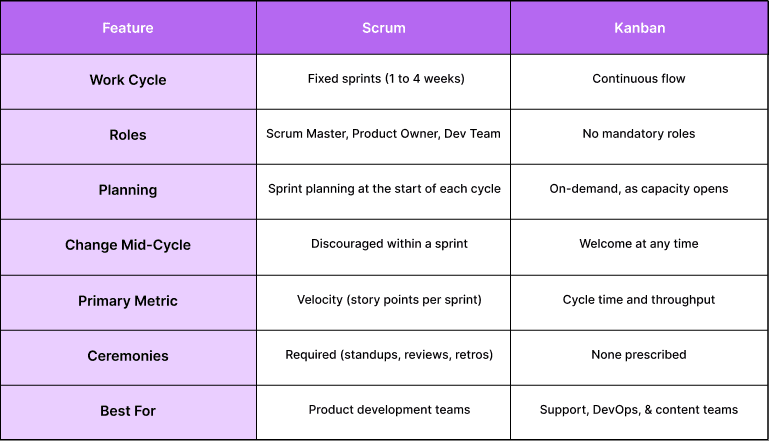
Feature | Scrum | Kanban |
|---|---|---|
Work Cycle | Fixed sprints (1 to 4 weeks) | Continuous flow |
Roles | Scrum Master, Product Owner, Dev Team | No mandatory roles |
Planning | Sprint planning at the start of each cycle | On-demand, as capacity opens |
Change Mid-Cycle | Discouraged within a sprint | Welcome at any time |
Primary Metric | Velocity (story points per sprint) | Cycle time and throughput |
Ceremonies | Required (standups, reviews, retros) | None prescribed |
Best For | Product development teams | Support, DevOps, and content teams |
Those differences become even more visible when you look at how each framework translates into day-to-day execution through its boards.
Also read: How to Take Meeting Notes That Boost Team Productivity?
Scrum Board vs Kanban Board: How They Work and Which One Fits Your Team
A board is only as effective as the system it is built on. Both Scrum and Kanban boards visualize work, but they are designed for entirely different ways of managing and delivering it. Here is how each board works in practice and which one actually fits your team:
The Scrum Board
A Scrum board is a sprint-specific tool that tracks only the work committed to within a fixed cycle. Once the sprint begins, the board is locked, and the team focuses solely on completing what was planned. It is built around accountability, predictability, and structured delivery.
Displays only tasks selected and committed to during sprint planning
Resets completely at the start of every new sprint cycle
Product Owner cannot add or edit tasks once the sprint has officially begun
A Scrum board fits your team if:
Your team works on a defined product with clear, planned deliverables
Stakeholders need regular visibility into what is being shipped each cycle
Your team benefits from structured routines, fixed goals, and sprint accountability
The Kanban Board
A Kanban board is a continuous, always-live system that reflects the real-time state of your team’s workflow. Work enters the board as it arrives and moves forward as capacity opens up. It is built around visibility, flexibility, and eliminating bottlenecks before they stall delivery.
Visualizes every stage of the workflow from intake to completion at all times
Accepts new tasks at any point without waiting for a cycle to begin
Columns, WIP limits, and workflow stages can be refined whenever the team learns something new
A Kanban board fits your team if:
Your work is continuous, unpredictable, and varies significantly in size and priority
Your team deploys frequently and cannot afford to wait until a sprint ends to ship
You need a lightweight system with zero mandatory ceremonies or rigid role structures
The Core Difference
A Scrum board tracks what your team has committed to delivering. A Kanban board tracks how your work is actually flowing right now.
Those differences don’t just stay theoretical; they show up clearly in how each team tracks and moves work every single day.
Recently added to Akiflow
Meeting Assistant: Akiflow’s Meeting Assistant records, transcribes, and summarizes your calls, then surfaces the follow-ups and decisions so nothing gets lost.
MCP (AI integration): Through MCP, Akiflow plugs into AI assistants like Claude and ChatGPT, letting you create and manage tasks, meetings, and deadlines from your favorite AI tool.
AI Workflows: Browse and apply community-built AI Workflows in Akiflow to automate how you plan, capture, and organize work.
Universal Inbox: Akiflow’s Universal Inbox gathers tasks and messages from Gmail, Slack, Notion, Asana and other tools into one view, and turns emails into tasks in a click.
Kanban vs Scrum: Pros and Cons
Pick the wrong framework and your team will feel it within weeks. Overcrowded boards, missed deadlines, and ceremonies that eat into actual work time are all signs of a mismatched framework. Here is an honest side-by-side look at where each framework wins and where it falls short:
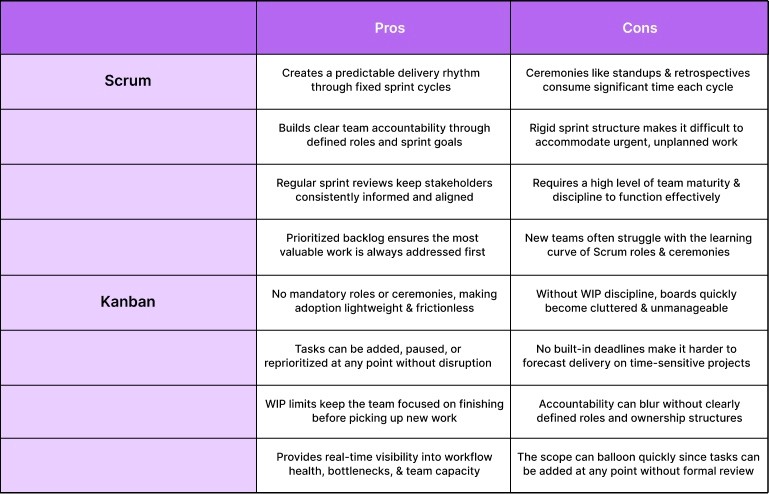
Pros | Cons | |
|---|---|---|
Scrum | Creates a predictable delivery rhythm through fixed sprint cycles | Ceremonies like standups and retrospectives consume significant time each cycle |
Builds clear team accountability through defined roles and sprint goals | Rigid sprint structure makes it difficult to accommodate urgent, unplanned work | |
Regular sprint reviews keep stakeholders consistently informed and aligned | Requires a high level of team maturity and discipline to function effectively | |
Prioritized backlog ensures the most valuable work is always addressed first | New teams often struggle with the learning curve of Scrum roles and ceremonies | |
Kanban | No mandatory roles or ceremonies, making adoption lightweight and frictionless | Without WIP discipline, boards quickly become cluttered and unmanageable |
Tasks can be added, paused, or reprioritized at any point without disruption | No built-in deadlines make it harder to forecast delivery on time-sensitive projects | |
WIP limits keep the team focused on finishing before picking up new work | Accountability can blur without clearly defined roles and ownership structures | |
Provides real-time visibility into workflow health, bottlenecks, and team capacity | The scope can balloon quickly since tasks can be added at any point without formal review |
With those trade-offs in mind, the choice becomes less about preference and more about what your team deals with on a regular basis.
Also read: The 80:20 Rule: What Does It Mean for Work and Productivity?
Which one Should You Choose, Scrum or Kanban?
The choice between Scrum and Kanban usually becomes obvious when deadlines start slipping, or work starts piling up in the wrong places. One gives you structure and rhythm, while the other exposes how your team actually handles incoming work and shifting priorities.
Here are the situations where each framework fits naturally:
When Scrum is the better choice
Your work can be planned in short, predictable cycles (1–4 week sprints)
You need clear deadlines and structured delivery milestones
Stakeholders expect regular updates and scheduled reviews
Your team benefits from defined roles and accountability
You are building features that require coordination and collaboration across roles
When Kanban is the better choice
Work arrives unpredictably, and priorities change frequently
You need maximum flexibility without disrupting ongoing work
Your team handles continuous flow tasks like support, maintenance, or ops
You want to focus on cycle time and throughput rather than deadlines
You prefer minimal process overhead with faster adoption
A practical way to decide
If your biggest problem is a lack of structure and missed commitments → choose Scrum
If your biggest problem is too much rigidity and constant interruptions → choose Kanban
Even then, most teams don’t run into trouble because of the framework itself, but because of how it gets used in practice.
Common mistakes teams make when choosing between Scrum and Kanban
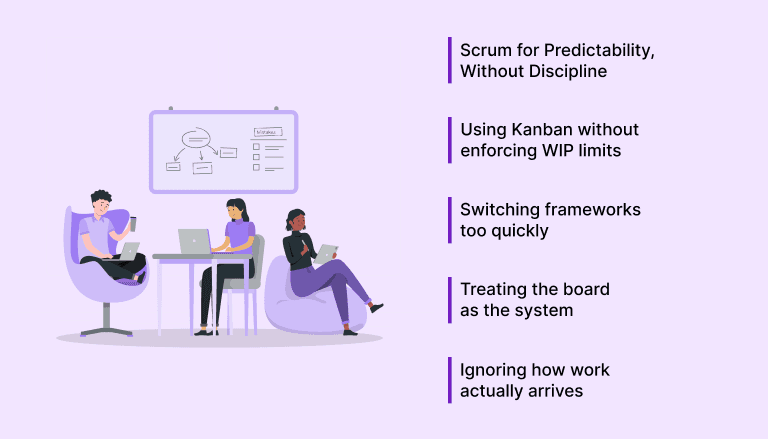
Most teams don’t struggle because they picked the “wrong” framework. They struggle because of how they apply it. In reality, the issues usually come down to a few recurring mistakes:
Choosing Scrum for predictability, but skipping discipline: Running sprints without clear planning, defined roles, or proper reviews leads to chaos disguised as structure
Using Kanban without enforcing WIP limits: Without limits, everything stays “in progress,” slowing delivery and cluttering the board
Switching frameworks too quickly: Teams often abandon Scrum or Kanban before fully understanding how it works in practice
Treating the board as the system: A board shows work. It doesn’t replace clear priorities, ownership, or execution habits
Ignoring how work actually arrives: Choosing Scrum when work is unpredictable, or Kanban when deadlines are strict, creates constant friction
And this is where something else starts to surface, the gap between how work is managed on paper and how it actually gets handled during the day.
Also read: How to Use Daily Reminders Without Getting Notification Fatigue
Stop managing tasks. Start getting real work done
You can run perfect sprints. You can optimize your Kanban board. And still spend half your day figuring out what actually needs attention.
Because the real friction isn’t in the framework. It’s in how your work is scattered across tools. Slack threads, emails, calendars, project boards. all slightly out of sync.
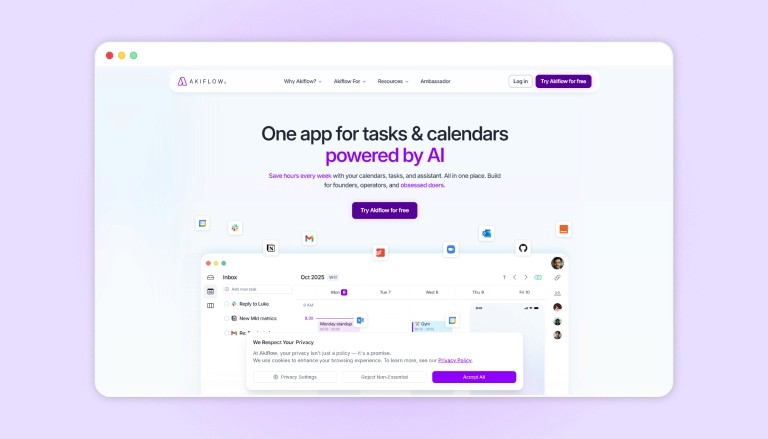
That’s where Akiflow starts to make a difference. It doesn’t replace Scrum or Kanban. It just makes your day finally feel coherent.
What changes when you use it:
Everything comes into one place: Pull tasks from Slack, Gmail, Notion, Asana, ClickUp, Jira, GitHub, and more into a single inbox
Messages and emails turn into tasks instantly: So nothing important gets buried or forgotten
Your tools stay in sync automatically: No duplication, no chasing updates across platforms
You plan to work directly on your calendar: Drag tasks into time blocks so your day reflects actual execution
Your schedule adapts when things shift: Because priorities always do
AI helps you keep momentum: Suggests next steps, organizes tasks, and reduces manual planning
The difference is simple. You’re not juggling tools anymore. You’re moving through your work with a plan that holds.
Wrapping Up
Scrum and Kanban both do what they’re meant to do. They bring clarity, structure, and visibility to how work moves through your team. The real difference comes down to how your team prefers to operate. whether that’s working in focused cycles or keeping things flowing continuously.
What tends to matter just as much is how that planned work shows up in your actual day. When tasks, meetings, and priorities are all aligned in one place, execution feels a lot smoother. That’s where something like Akiflow fits in naturally. It helps you take whatever system you’re using and turn it into a clear, workable plan you can follow through on.
If you want your tasks and schedule to finally work as one, Try Akiflow and see how it fits into your workflow.
FAQs
Should I use Scrum or Kanban for my team?
Choose Scrum if your team works toward planned deliverables with clear deadlines and needs structured cycles. Choose Kanban if your work is continuous, unpredictable, and requires flexibility without fixed sprint commitments.
When should a team switch from Scrum to Kanban?
Teams usually switch to Kanban when sprint commitments keep getting disrupted by unplanned work or urgent requests. It becomes a better fit when maintaining flow matters more than sticking to fixed timelines.
Is Scrum better for product development than Kanban?
Scrum is often preferred for product development because it supports iteration, stakeholder feedback, and structured delivery cycles. Kanban can still work well if the product requires continuous releases without strict sprint boundaries.
Can Kanban handle deadlines and time-sensitive projects?
Kanban can handle deadlines, but it requires additional discipline, like prioritization rules and explicit policies. Scrum naturally supports deadlines through sprint commitments and time-boxed delivery cycles.
Why do Scrum teams struggle in real-world execution?
Scrum teams often struggle when work outside the sprint (like ad hoc requests or meetings) isn’t accounted for in planning. This creates a gap between what’s planned in the sprint and what actually gets done day to day.


