

The average knowledge worker loses nearly 28% of the workday to interruptions and task-switching, according to research cited by McKinsey. That is not a minor inconvenience. It is a structural problem that plays out across every role, every industry, and every time zone.
For founders juggling investor calls, developers switching between sprints, or freelancers managing five clients at once, the problem is the same: there is never enough structure to keep up with the volume of work. Calendars fill up. Tasks scatter across apps. Priorities blur until everything feels urgent and nothing feels done.
An AI life planner helps change this equation. By combining intelligent task organization, time-blocking, and scheduling assistance, these tools help busy professionals regain control of their day with better structure and planning support. The right system does more than organize tasks. It surfaces priorities, highlights scheduling conflicts, and helps you adjust plans quickly when priorities change.
This guide breaks down how AI-powered planning works, what features actually matter, how to build a high-performance routine around one, and what to watch out for along the way.
Key Takeaways
An AI life planner goes beyond a to-do list by combining tasks, calendar data, and adaptive scheduling that learns how you work.
AI-protected time blocking boosts output; a structured 40-hour week can outperform a reactive 60-hour one.
Task centralization is essential. The AI can only prioritize what it can see across your tools.
Daily five-minute reviews help you refine tomorrow’s schedule and keep your priorities aligned.
Free AI planner tools work for light use, but complex workflows need deeper integrations and smarter scheduling.
What Is an AI Life Planner?
An AI life planner is a smart productivity system that uses artificial intelligence to help users organize tasks, schedule time, and manage priorities across all areas of life: work projects, personal goals, health routines, and everything in between.
Unlike a traditional to-do list or static calendar, an AI life planner helps organize tasks, suggest scheduling improvements, and make it easier to adjust plans when priorities change. It brings together the functionality of a task manager, calendar, and scheduling workspace inside a single interface.
How It Differs from a Standard Digital Planner
A standard digital planner is essentially a paper planner in app form. You input tasks manually, set reminders, and manage the layout yourself. An AI-enhanced version goes significantly further. Here is what sets it apart:
It helps you organize tasks and quickly convert them into time blocks based on your priorities.
It detects scheduling conflicts before they cause problems, not after.
It adjusts your plan dynamically when priorities shift mid-day.
It centralizes inputs from emails, Slack, project tools, and calendars into one unified daily view.
The result is a planner that works with you rather than one you constantly have to update and reorganize yourself.
Why "AI" in Planning Is More Than a Buzzword
The intelligence in a modern AI digital planner is not just surface-level automation. It involves:
Highlighting scheduling patterns and helping you organize focused work blocks
Prioritization tools that help surface the most important tasks during daily planning
Scheduling assistance that helps you allocate realistic time blocks for important work
Flexible scheduling tools that help refine your planning workflow over time
That behavioral layer is what separates a genuinely intelligent planner from a calendar with a chatbot attached.
Also Read: Top AI Time Blocking Tools to Help You Take Control of Your Calendar
Why Busy Professionals Need AI-Powered Planning
Time management challenges are not new. What has changed is the complexity of the environment in which professionals operate today. More tools, more notifications, more modes of communication, and more competing priorities than any single calendar or to-do list was ever designed to handle.
The Hidden Cost of Scattered Tasks
Research from the Harvard Business Review confirms that attention residue, the cognitive hangover from switching tasks, significantly reduces performance on subsequent work. Most knowledge workers use five or more productivity tools simultaneously, and each app holds only a fragment of the day's reality:
A task lives in Asana
A deadline is buried in an email thread
A priority was set in a Slack message three days ago
Without a single system to consolidate and surface all of it, important work slips through the cracks, not because of negligence, but because of sheer structural fragmentation.
The Case for AI-Assisted Scheduling
A McKinsey report on generative AI found that AI has the potential to automate up to 70% of the time employees spend on routine cognitive tasks. Scheduling and task triage fall squarely within that category.
Who Benefits Most
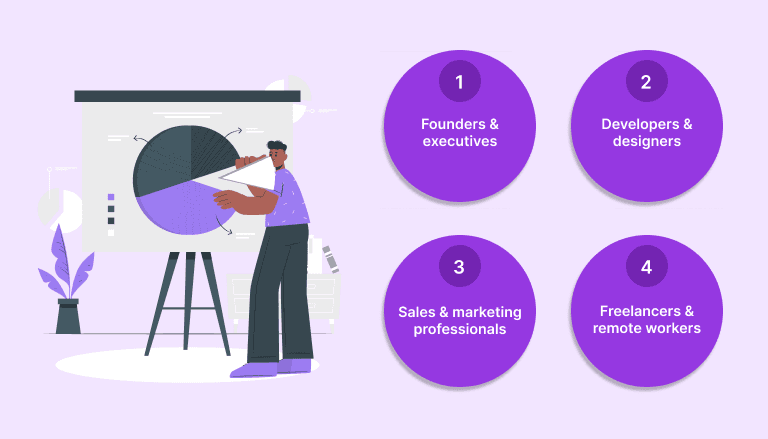
AI-powered planning delivers meaningful results across a wide range of roles, but the sharpest improvements tend to show up in these profiles:
Founders and executives benefit from conflict detection and priority surfacing, keeping strategic work from getting buried under reactive tasks
Developers and designers benefit from protected deep work blocks that prevent meetings from fragmenting their most cognitively demanding hours
Sales and marketing professionals benefit from automated task capture from email and CRM tools, so follow-ups and deadlines never get lost
Freelancers and remote workers benefit from a centralized task view that replaces the daily scramble across five different apps
Must Read: How Productive People Plan Their Day (And What You Can Copy)
Core Features to Look for in an AI Life Planner
Not every tool calling itself an AI planner delivers equal value. The market is crowded with apps that offer basic scheduling dressed up with AI branding. When evaluating options, focus on the features that solve real friction points in your day rather than the ones that look impressive in a product demo.
1. Intelligent Time Blocking
Time blocking is one of the most effective productivity techniques endorsed by deep work researcher Cal Newport. In his book Deep Work, Newport argues that a 40-hour time-blocked week produces more meaningful output than a 60-hour reactive one.
The best AI planners go beyond static blocks. They automatically allocate time based on:
Task priority and urgency
Estimated duration and your historical accuracy on similar tasks
Your energy patterns throughout the day
Existing calendar commitments and buffer time
A developer might configure the tool to protect 9 AM to 12 PM for focused coding. The AI then schedules meetings and admin tasks around that window rather than into it.
Akiflow's Drag-and-Drop Time Blocking feature lets professionals move tasks directly from their inbox into calendar slots with zero friction. You can set recurring focus blocks, color-code project types, and build a visual schedule that reflects both what needs to happen and when it will realistically get done.
2. Task Centralization from Multiple Sources
A robust AI-powered digital planner pulls tasks from tools like Asana, Jira, Notion, Gmail, Slack, Linear, and Todoist into a single unified view. No more switching tabs to piece together your workload across six different platforms every morning.
When a Slack message becomes an action item, a good planner lets you capture it instantly and drop it into a time slot. Akiflow's Unified Inbox does exactly this, automatically importing tasks and action items from 20-plus connected tools so your planning session starts from a complete picture rather than an incomplete one.
3. Calendar Intelligence and Conflict Detection
A good planning tool should make it easy to spot scheduling conflicts and adjust your calendar before problems arise. Look for a tool that:
Identifies back-to-back meetings with no transition buffer
Detects double-bookings across multiple calendars
Suggests optimal times for focus blocks based on meeting patterns
Alerts you when a scheduled task conflicts with a new calendar event
Without clear calendar visibility, professionals often discover conflicts too late to adjust effectively. With it, the system proactively surfaces problems and automatically offers a revised plan.
4. Daily Planning Rituals
The best AI life planner tools build a structured daily review into the workflow. Each morning, the system surfaces:
What is overdue and needs immediate attention
What is the highest priority for the day ahead
What should be rescheduled or deprioritized
Any conflicts or gaps in the day's plan
This mirrors the Weekly Review ritual from David Allen's Getting Things Done methodology, but executed daily with AI precision. Akiflow's Rituals Assistant guides users through a morning planning session and a brief evening review, building consistency that compounds into significantly better scheduling over time.
5. Flexibility and Rescheduling
Plans change. An AI planner creator should make rescheduling frictionless, not a 10-minute manual update process. The best tools:
Allow drag-and-drop rescheduling directly on the calendar
Auto-adjust dependent tasks when a priority shifts
Surface the downstream impact of a change before you confirm it
Offer a revised daily plan instantly after any major schedule change
Also Read: The Science of Blocking Time: A Smarter Way to Work
How to Build a High-Performance Routine with an AI Life Planner
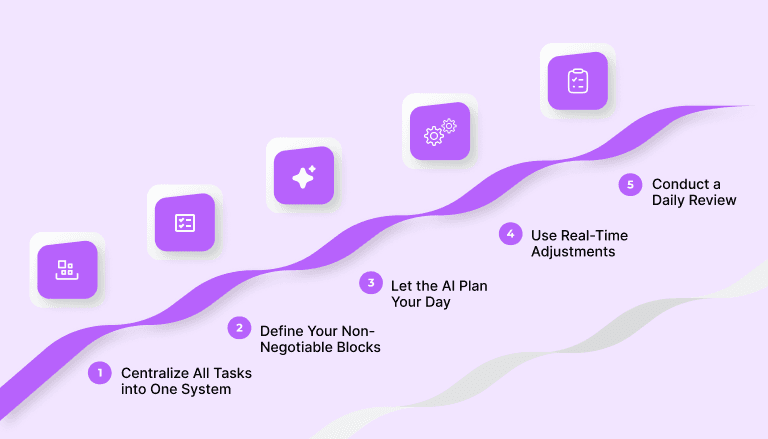
Having the right tool is only half the equation. Building a sustainable system around it is what separates professionals who consistently perform at a high level from those who stay overwhelmed despite having good tools. The following framework is practical, repeatable, and designed for real-world conditions rather than ideal ones.
Step 1: Centralize All Tasks into One System
Before AI can help prioritize, everything needs to live in one place. The goal is a single source of truth for your workload. To get there:
Connect Gmail or Outlook to capture email-based action items automatically
Integrate Slack to turn messages into schedulable tasks without switching apps
Sync project tools like Asana, Jira, or Trello for team deliverables
Add personal tasks using natural language input or manual entry
Once everything is in one place, the AI has the complete picture it needs to make genuinely useful scheduling suggestions.
Step 2: Define Your Non-Negotiable Blocks
Work with the AI to protect time for your highest-value activities before anything else gets scheduled. A practical setup for a founder might look like this:
8 AM to 10 AM daily, strategic priorities and deep work, no interruptions
After 2 PM, all external meetings and calls
Friday afternoon, weekly review and forward planning session
Label these blocks, set them as recurring defaults, and configure the tool to treat them as protected time rather than available slots. These guardrails give the AI the context it needs to build a plan that reflects actual priorities.
Step 3: Let the AI Plan Your Day
Each morning, open your AI daily planner and let the system surface a prioritized agenda rather than building one from scratch. Review the suggested plan, adjust any conflicts, and commit to the structure before the first task begins. This ritual takes under 10 minutes and eliminates the decision fatigue of figuring out what to work on next.
Akiflow's Focus Timer supports this by locking you into a distraction-free mode once the day's plan is set, shielding focus blocks from interruptions throughout the day.
Step 4: Use Real-Time Adjustments
When a priority shifts midday, use the AI to automatically reschedule affected tasks. The best tools surface the downstream impact of a change and instantly offer a revised plan, so you can course-correct in seconds rather than spending 10 minutes manually reorganizing the schedule.
Step 5: Conduct a Daily Review
End each day with a five-minute review. The habit is simple, but the compounding effect is significant:
Mark completed tasks to clear the slate
Carry over anything unfinished with updated priority
Note what derailed focus, so patterns become visible over time
Use natural language capture for anything that needs to be logged before it slips
Akiflow's Smart Task Capture lets you log items instantly using plain language, with the system automatically placing them into the next available time slot.
Also Read: AI Productivity Tools in 2026: What's Actually Useful vs What's Just Hype
Free vs. Paid AI Planner Tools: What's the Difference?
A growing number of AI planner creator free options have entered the market, making AI-assisted planning accessible to independent professionals and small teams. These tools lower the barrier to entry and are a useful starting point. However, free tools come with real trade-offs that become more significant as workflow complexity increases.
What Free AI Planner Generators Typically Offer
Most free AI planner tools cover the fundamentals, but come with meaningful limitations:
Basic task input and AI-suggested scheduling
Calendar integration with one or two apps only
Monthly caps on AI suggestions or connected tasks
No team-facing features or shared calendar views
Limited behavioral learning across sessions
For someone testing AI planning for the first time, these trade-offs are reasonable. For someone managing a complex multi-tool workflow with high task volume, a ceiling becomes visible quickly.
Where Paid Platforms Pull Ahead
Full-featured platforms differentiate on the depth of integration, quality of AI scheduling logic, and the degree to which they reduce manual effort at scale. A paid AI planning platform typically delivers:
Integrations with ten or more tools, including Slack, Asana, Linear, Gmail, and Notion
Real-time two-way sync rather than periodic imports
Contextual AI that learns energy patterns and recurring preferences
Proactive conflict detection across multiple calendars
Team visibility and collaboration features for managers
For freelancers exploring AI planning for the first time, a free AI planner generator is a perfectly practical starting point. For professionals managing complex workloads across teams and tools, a full-featured platform delivers a return on investment that typically becomes visible within the first week of consistent use.
Common Mistakes Professionals Make with AI Planning Tools
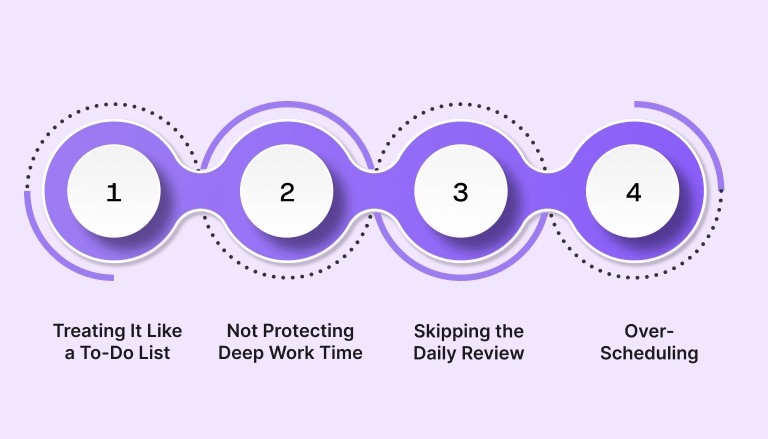
Adopting a new planning system is only the first step. The way you use it determines whether it delivers meaningful results or just adds another app to the stack. These are the four mistakes that consistently prevent professionals from getting the most out of an AI life planner.
Mistake 1: Treating It Like a To-Do List
An AI life planner is most powerful when time-blocking is fully integrated into the workflow. Simply dumping tasks into a list without assigning time defeats the purpose entirely. The fix is straightforward:
Every task should have a designated time slot, not just a priority label
Use the AI's scheduling suggestions rather than overriding them manually
Treat the calendar as the primary planning surface, not the task list
Mistake 2: Not Protecting Deep Work Time
If the calendar is left fully open, AI schedulers will fill available gaps with whatever is pending, including low-value admin tasks that could be batched or deferred. Define focus blocks first. Configure the tool to treat them as protected time before scheduling anything else. This single decision separates a high-performance schedule from a reactive one.
Mistake 3: Skipping the Daily Review
The daily review is where the AI learns from behavior. Without it:
The tool cannot adapt to individual preferences over time
Recurring friction points in the schedule stay invisible
AI suggestions remain generic rather than personalized
Even five minutes at the end of each day adds up to significantly better scheduling accuracy over weeks and months.
Mistake 4: Over-Scheduling
AI tools can suggest dense schedules that look productive on paper but leave no buffer for the unexpected. Always build in:
Transition time between back-to-back tasks
At least one open block per day for reactive work
Unstructured thinking time that fuels creative problem-solving
A schedule with no slack is a schedule that fails the moment anything unexpected happens, which is every day.
Must Read: Time Blocking for Beginners: How to Master Your Schedule in 2026
AI Life Planner vs. Traditional Scheduling Tools: A Quick Comparison
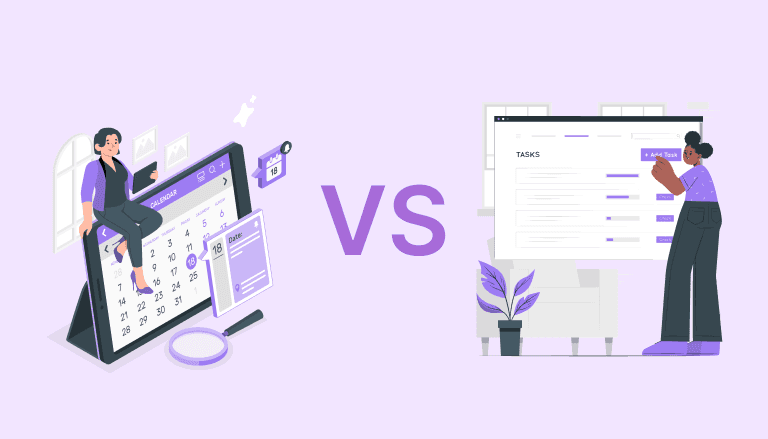
Many professionals wonder whether an AI-powered approach is meaningfully better than the tools they already use. Here is a direct feature-by-feature breakdown across the dimensions that matter most in daily use.
Task Centralization
AI life planner: Pulls tasks from ten or more sources automatically with real-time sync
Traditional tools: Require manual entry across each platform individually
The cognitive cost of the manual approach is not just the time spent entering tasks. It is the mental overhead of maintaining awareness across multiple systems simultaneously throughout the day.
Scheduling Intelligence
AI planner: Suggests optimal time blocks based on priority, duration, and behavioral patterns
Traditional calendar: Shows availability only, placing the full burden of scheduling logic on the user
Conflict Detection
AI planner: Detects and flags conflicts proactively, often before they appear on the calendar
Traditional tools: Rely entirely on the user to notice double-bookings or deadline clashes
Daily Planning
AI planner: Surfaces a prioritized agenda each morning based on what is due, deferred, and highest impact
Traditional tools: Display everything equally with no prioritization layer
Adaptability
AI planner: Rebalances the plan automatically when priorities shift during the day
Traditional tools: Require manual reorganization, which often does not happen, leaving an outdated plan in place
For professionals managing complex, multi-tool workflows, the AI approach wins on every dimension where speed and cognitive overhead matter.
Conclusion: Structure Is the Foundation of High Performance
The professionals who consistently outperform their peers are not necessarily working more hours. They are working with more intention. An AI life planner provides the structure that makes intentional work easier to plan and maintain every day.
By centralizing tasks, protecting deep work time, and using AI to guide daily priorities, any professional can reclaim the focus that scattered systems have been quietly eroding. The tools to do this exist now and continue to get more powerful.
Building the habit is the hard part. The AI handles the rest.
Ready to build a smarter, more structured workday? Try Akiflow today and experience the difference a truly intelligent daily planning system makes. Start your free trial and save hours every week.
Frequently Asked Questions
1. What is an AI life planner, and how does it work?
An AI life planner is a productivity tool that uses artificial intelligence to help users organize tasks, schedule time, and manage daily priorities. It connects to the apps you already use, email, Slack, project management tools, calendars, and uses AI to:
Suggest the best times for specific tasks based on priority and energy patterns
Detect and resolve scheduling conflicts before they disrupt the day
Pull tasks from multiple sources into one centralized view
Adapt the plan automatically when priorities shift
Over time, you can refine your planning process and scheduling habits using the tool.
2. Is there a free AI planner generator I can try?
Yes, several platforms offer free-tier AI planning tools that cover basic scheduling and task management. These are a practical starting point for individuals with lighter workloads or those new to AI-assisted planning. For professionals managing complex multi-tool environments or high-volume tasks, a full-featured platform offers deeper integrations, behavioral learning, and scheduling intelligence that free tiers typically do not include.
3. How is an AI digital planner different from Google Calendar?
Google Calendar shows availability and allows manual event creation. An AI digital planner goes further by:
Pulling tasks from multiple external tools automatically
Suggesting time blocks based on priority and behavioral patterns
Detecting conflicts proactively rather than waiting for the user to notice
Adapting the plan automatically when circumstances change
It acts as an intelligent scheduling layer on top of your calendar rather than simply a visual display of your day.
4. Can an AI planner creator help with deep work and focus?
Absolutely. Protecting focus time is one of the core strengths of a well-configured AI planner creator. By designating recurring deep work blocks and configuring the AI to treat them as non-negotiable, professionals can consistently defend the uninterrupted time that high-quality, cognitively demanding work requires. This is the approach popularized by Cal Newport and increasingly automated by modern AI planning platforms.


