AI Productivity Tools in 2026: What’s Actually Useful vs What’s Just Hype

10
AI is everywhere in 2026, but not always where it matters most. It writes emails, answers questions, suggests task lists, and automates parts of knowledge work. Tools like Google Workspace, Notion, and Microsoft Copilot are now shipping with AI by default, not as a bonus feature.
The promise is real. McKinsey reports AI could contribute $4.4 trillion in productivity gains annually, with the biggest lift in work done behind screens.
But in day-to-day work, most professionals are not seeing that kind of return. AI is often introduced as a shortcut without a clear process behind it. A tool might help summarize a meeting, but if the action items aren’t scheduled or followed up, nothing changes.
The gap isn’t the tech—it’s the system the tech is dropped into. Exploring real Claude Cowork use cases for marketing teams shows that AI adds the most value when it plugs directly into clear workflows like data collection, decision-making, and daily reporting.
In 2026, the smartest professionals aren’t using AI to do more. They’re using it to do less with more precision. The next section breaks down what to look for in an AI tool that actually supports this approach.
Key Takeaways
AI tools in 2026 are most effective when integrated into structured workflows, not added as extras
Professionals using AI well are focusing on clarity, not volume; doing less with sharper intent
Top AI productivity tools: Akiflow, Google Workspace (Gemini), Notion AI, Motion, and Reclaim
Tools like Asana, Notion, Trello, ClickUp and Chanty that matter are those that reduce decisions, schedule work automatically, and adapt to real-time constraints
What to Look for in an AI Productivity Tool
The market is full of AI productivity apps in 2026, but most of them fall into one of two categories: overhyped assistants that create more output than progress, or narrow tools that automate one task without improving the workflow around it.

The best AI tools are the ones that reduce friction in the way you already work. They don’t reinvent your process. They improve it without adding complexity.
Here’s what actually matters when evaluating whether an AI tool is worth your time.
It Fits Into Your Existing Workflow
If a tool requires you to open a separate app, learn a new interface, or remember to check another dashboard, it probably won’t last. The most effective tools show up where the work already happens; inside your calendar, email, meeting notes, or task list.
For example, an AI agent or AI assistant that captures tasks directly from your inbox and surfaces them in your planner is more valuable than a chatbot that requires constant prompting. AI assistants are only as useful as the information they can reach, which is why teams increasingly connect them to knowledge management software that stores institutional knowledge in one place.
It Automates What You Normally Delay
Look for tools that take over decisions or actions that usually cause delay. This could include sorting your inbox, scheduling time blocks based on task priority, or rewriting updates for your team. The best tools reduce your time to start, not just your time to finish.
If you still have to think through how to use it, it’s not saving you enough.
It Shows Impact You Can Measure
Good AI tools give you a clear sense of what they are replacing. For example: hours saved per week, fewer calendar conflicts, shorter time spent organizing notes, or fewer clicks between systems. AI image editing tools should be evaluated the same way, with measurable improvements in editing speed, consistency, and overall workflow efficiency.
If a tool doesn’t show real results after seven days of use, it’s just digital noise.
It Keeps You in Control
Automation without control is dangerous for focus. The ideal AI tool makes suggestions and surfaces actions but leaves final decisions in your hands. This becomes even more important as tools increasingly handle sensitive data and workflows; cybersecurity research from Cybernews has highlighted how poorly transparent AI systems can increase risks around data exposure, making user control and visibility essential for any productivity stack. For teams running automated workflows, routing traffic through cheap dedicated datacenter proxies keeps your internal systems separated from third-party platforms without slowing things down.
For professionals, clarity and control are essential, especially for teams that operate under an assume breach approach, where every tool in the stack is evaluated for how it handles data exposure, not just how it improves efficiency. Before allowing an AI tool to change your workflow, check what data it can access, how to review its decisions, and whether you can undo its actions.
Must read: Best AI Tools for Developers in 2026
Top AI Productivity Tools to Try in 2026
AI tools are no longer just add-ons or experimental features. In 2026, the most valuable AI tools are built directly into how professionals manage time, information, and communication. Below are five that stand out; not because they use AI, but because they make work faster, cleaner, and easier to execute without losing control.
Each one solves a specific problem that shows up in real workflows.
1. Akiflow (AI Scheduling + Task Capture)

Best for: Professionals who want less app switching and more time blocking
Akiflow combines AI-driven task capture with a powerful scheduling layer. It pulls tasks from email, Slack, and project tools, then helps users turn them into time blocks based on real calendar availability. Unlike tools that just suggest next steps, Akiflow prioritizes execution by helping you put goals into your actual week.
How it helps:
Suggests when to do tasks based on calendar gaps
Removes redundant scheduling steps from daily planning
Centralizes tasks across apps so nothing gets lost between tools
2. Google Workspace with Gemini
Best for: Professionals who already rely on Gmail, Docs, Sheets, and Calendar
Gemini is now deeply embedded into Google Workspace, where it offers AI summaries of documents, email drafts, calendar optimization, and meeting insights. It is useful not because it adds new tools, but because it makes existing tools faster to use. For teams that already live in Google’s ecosystem, it upgrades the workflow without requiring behavior change.
How it helps:
Drafts emails and documents with context from your files
Suggests meeting times based on shared availability and workload
Summarizes long threads or notes so you can skip reading and start deciding
3. Notion AI
Best for: Knowledge workers who need flexible content creation and linked thinking
Notion AI is less about task automation and more about reducing cognitive load. It helps professionals generate meeting notes, project summaries, and even documentation inside their existing workspace, and can be integrated with an interactive presentation maker that turns this content into clear, visually engaging slides. The key benefit is speed, not just in writing, but in organizing and connecting ideas without manual sorting.
How it helps:
Converts messy notes into usable content
Suggests next steps or summaries after a meeting
Auto-tags and refines internal knowledge bases without extra formatting
4. Reversely.ai
Best for: Professionals who need to verify images, detect duplicates, or trace visual sources quickly
Reversely.ai focuses on helping individuals in understanding where an image comes from and how it is being used. It goes beyond basic reverse image search by using AI to detect similar images, identify faces, and analyze visual patterns across the web. For marketers, recruiters, and content teams, it reduces the time spent manually validating images or checking authenticity.
How it helps:
Finds visually similar images even when they are edited, cropped, or resized
Helps detect fake profiles or reused images through face search
Tracks where an image appears online to verify originality and usage
5. Motion
Best for: People who want AI to auto-plan their day
Motion takes control of your calendar by automatically assigning tasks into your available time slots. It is aggressive by design, constantly reshuffling your day based on urgency and changes. While it works well for people with task overload, it can feel too rigid for those who prefer manual planning.
How it helps:
Auto-schedules tasks with deadlines based on calendar events
Reschedules meetings or blocks if something new comes up
Prioritizes work based on preset rules and urgency
6. Reclaim.ai
Best for: Balancing personal routines with team demands
Reclaim protects time for things that usually get pushed aside. It uses AI to automatically block your calendar for habits like focus time, lunch breaks, or workout sessions, while still flexing when meetings come up. It is less about doing more and more about protecting space for high-impact routines.
How it helps:
Creates smart recurring blocks that adjust to meeting changes
Defends time for deep work or routines without requiring constant rescheduling
Works well for people who already live in Google Calendar
Each of these tools succeeds by doing one thing very well. They either help you act faster, protect your time, or reduce the steps between intention and action. None of them work in isolation. Their real value shows up when paired with systems that already support clarity and execution.
7. Marlee
Best for: Teams and leaders focused on improving collaboration, motivation, and overall team performance
Marlee is an AI performance and collaboration platform designed to help teams understand what truly drives people at work and how to work better together. Instead of focusing purely on task automation, it emphasizes human dynamics—making it especially useful for building alignment, improving communication, and nurturing high-performing teams. It translates soft signals like motivation, preferences, and working styles into practical insights teams can act on daily.
How it helps:
Runs motivation assessments to uncover what drives each team member
Provides AI-driven coaching insights to improve collaboration and goal-setting
Visualizes team dynamics through boards and performance insights for better decision-making
8. Venturz
Best for: Founders and early-stage teams who are tired of stitching together ten different tools to run their business
Most entrepreneurs waste hours every week switching between a CRM, email marketing tool, website builder, community platform, and project manager — none of which talk to each other. Venturz eliminates that friction by bringing all of it under one roof, powered by AI. Instead of managing a stack, you manage your business. The AI layer handles the repetitive work — drafting campaigns, generating copy, surfacing insights — so founders can stay focused on growth, not operations.
How it helps:
Replaces multiple standalone tools with a single platform covering CRM, website builder, email marketing, community, helpdesk, and affiliate management — removing the cost and complexity of a fragmented stack
Uses built-in AI to generate content, automate workflows, and surface actionable insights, so founders spend less time on execution and more time on decisions that actually move the needle
Gives early-stage teams the infrastructure of a much larger company from day one, without the overhead of managing dozens of subscriptions, integrations, or logins
9. Invideo
Invideo is a complete AI-powered creative suite that makes it easy to create videos, images, audio, and music from simple ideas. You can start with a prompt, a rough script, or even existing visuals, and shape them into polished content with tools for voiceovers, captions, and editing built in. It fits naturally into different workflows, whether you’re creating from scratch or trying to convert image into video as part of a larger project. Everything works together in one place, so the process feels smooth without jumping between multiple tools.
How it helps:
Turns ideas into ready content across video, image, and audio formats
Improves output with built-in editing, captions, and voice tools
Helps create content that works across different platforms and audiences
Keeps the workflow simple by bringing everything into one place
10. Uniqode
Best for: Teams and professionals who want faster access to information, fewer manual steps, and smoother offline-to-digital workflows
Uniqode’s QR Code Generator helps businesses reduce friction in everyday workflows by turning physical touchpoints into instant digital actions. Teams use it to simplify event check-ins, share digital business cards, collect feedback, enable contactless access to documents, onboard employees faster, and connect customers directly to apps, forms, or support pages without extra navigation. In productivity-focused environments, it helps save time, reduce repetitive tasks, and improve accessibility across distributed teams and customer interactions.
How it helps:
Reduces manual sharing and repetitive back-and-forth with instant QR-based access
Connects offline materials to digital workflows, forms, documents, and tools
Tracks engagement and scan activity to measure interaction across campaigns and operations
11. Social Champ
Best for: People who want free social media scheduling tools with AI-powered automation
Social Champ helps you stay consistent on social media by automatically scheduling, organizing, and managing your content across multiple platforms. It is designed to save time, reduce manual work, and simplify workflows for brands, creators, and agencies looking for social media management tools. While it works well for teams and busy professionals, users who prefer fully manual posting may find its automation-heavy approach less flexible.
How it helps:
Auto-schedules posts across multiple social media platforms
Recycles evergreen content to keep profiles active consistently
Helps plan, organize, and manage content from a single dashboard
Also read: 9 Must-Have AI Tools for Product Managers
How to Choose the Right AI Productivity Tool for Your Role
There is no one-size-fits-all AI solution. The best tool for a founder juggling strategic decisions will not be the same as the best choice for a freelancer managing client deadlines or a remote team member balancing internal meetings with focused work. Choosing the right AI tool comes down to how you work, what slows you down, and which part of your workflow needs actual support.
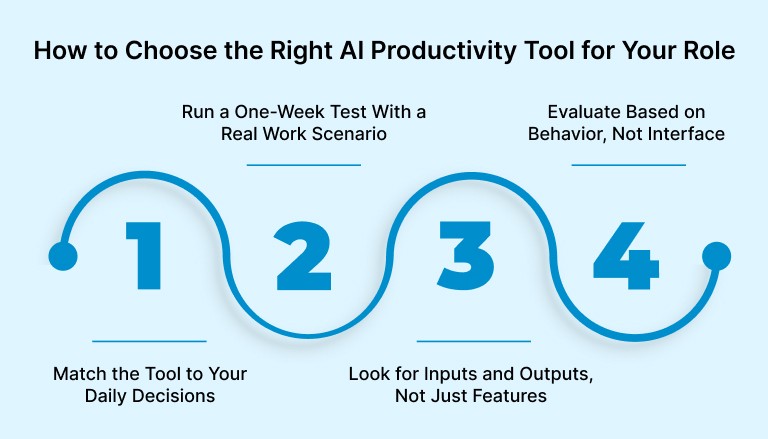
Match the Tool to Your Daily Decisions
Start by identifying where decisions get bottlenecked. If scheduling is where time gets lost, a tool like Akiflow or Reclaim can help convert floating tasks into committed calendar time. If content creation is slowing you down, Notion AI or Gemini may be more effective. AI is not the solution to everything. It works best when aimed at one clear friction point.
Run a One-Week Test With a Real Work Scenario
Avoid testing tools in the abstract. Instead, pick one recurring task you already do and try to improve that process for seven days. For example:
Use Notion AI to draft and organize internal updates
Let Akiflow suggest time blocks for your most important goals
Try Motion to schedule one full day of backlogged tasks
The goal is to measure what actually changed. Did the tool help you move faster or think more clearly? Did it reduce decisions or just create new ones?
Look for Inputs and Outputs, Not Just Features
The most helpful AI tools integrate with the apps that generate work. They pull from email, Slack, project tools, or calendar data, then translate that input into suggested actions. If a tool requires extra manual input or adds steps to your workflow, review whether it is saving time. Check permissions and data-handling settings before connecting sensitive information.
You should be able to see a task once, decide once, and let the tool handle the rest.
Evaluate Based on Behavior, Not Interface
The best AI tools fade into the background. They do not require a new interface or dashboard. Instead, they nudge you toward better behavior: blocking time for focused work, reducing repetitive tasks, or clarifying next steps.
If you are spending more time learning the tool than using it, it is not built for your level of focus.
Must read: The Only Time Management Apps You Need in 2025
How to Make AI Work Within Your Daily Time Block System
AI adds real value when it supports your ability to focus, not when it adds more layers to manage. For professionals who already time block their day, the goal is not to use more tools, but to make smarter decisions about when and how AI is involved in the work.
Here’s how to build AI into your daily system without disrupting it:
Assign AI-Supported Work to Specific Time Blocks
AI helps with execution, but it still requires your attention. Reviewing AI-generated drafts and approving scheduling suggestions both take time. Block out time to verify facts, revise unclear wording, and check suggested actions before accepting them.
Avoid using AI reactively throughout the day. Instead, plan when it fits into the workflow. For example:
Use a 30-minute block in the morning to process AI-generated summaries and task suggestions
Reserve a planning block each Friday to review AI-scheduled time blocks for the following week
Standardize Where AI Fits into Your Weekly Rhythm
The most consistent productivity gains from AI come when it’s tied to repeated systems. For instance, use AI during your weekly review to help categorize backlog tasks, reprioritize projects, or write progress reports.
By assigning AI to specific steps in a recurring workflow, you reduce decision fatigue and make its role predictable. This leads to better adoption and cleaner output.
Use AI to Clean the Edges of Your Focus Blocks
Focus time often gets interrupted by low-effort, high-frequency tasks like formatting notes, summarizing updates, or generating responses. These tasks pull your attention but rarely justify full mental effort. Use AI to handle these edge cases so your focus blocks stay clear.
Examples:
Use AI to summarize meeting notes while you prepare for the next task
Let an assistant draft your follow-up so you don’t lose flow between calls
Review Output Before It Hits the Calendar
AI can be helpful in creating tasks, scheduling them, and suggesting next steps. But these suggestions still need review. Before any AI-generated work hits your calendar or gets committed to a plan, take a few minutes to review and edit.
A blocked hour based on a bad suggestion is still a wasted hour.
Recently added to Akiflow
Meeting Assistant: An AI meeting assistant that records and transcribes your meetings, writes summaries, and automatically captures action items and decisions.
MCP (AI integration): Connect Akiflow to AI tools like Claude and ChatGPT through MCP, so you can manage tasks, meetings, and deadlines straight from your AI assistant.
AI Workflows: Ready-made, community-built AI workflows you can use inside Akiflow to automate planning and task management.
Universal Inbox: Pull tasks and emails from Gmail, Slack, Notion, Asana and more into one place, and turn any email or message into a task.
Two-Way Calendar Sync: Two-way sync with Google Calendar and Outlook keeps your schedule consistent everywhere.
Final Thoughts
AI will not fix a broken workflow. What it can do is accelerate the systems you already use to prioritize, plan, and execute. Without structure, AI just produces more input. With structure, it becomes an edge.
Akiflow gives that structure. It turns incoming tasks into scheduled work, centralizes your inputs, and protects time for what matters. When AI tools suggest what to do, Akiflow makes sure it actually gets done.
If AI is becoming part of your stack, make sure your calendar and task system are ready for it.
Try Akiflow to turn smart suggestions into real work blocks. Start by connecting your tools and planning one focused day. The rest will follow.
FAQs
Q: What are the best AI productivity tools in 2026?
A: Top tools include Google Workspace with Gemini, Notion AI, Akiflow, Motion, and Reclaim. Each serves a different use case, from writing and planning to task scheduling and time blocking.
Q: Can AI really improve work productivity?
A: Yes, when used correctly. AI tools help reduce time spent on repetitive tasks, automate scheduling, and speed up decision-making. The key is integrating them into an existing workflow.
Q: How does AI help with time management?
A: AI can analyze your calendar, prioritize tasks, suggest focus blocks, and automatically schedule work sessions. Tools like Akiflow and Motion specialize in this kind of support.
Q: Is AI useful for daily planning?
A: Yes. AI can surface high-priority tasks, suggest time slots based on your availability, and remove the need for manual planning. It improves consistency and reduces context switching.
Q: Which AI tool is best for freelancers or remote workers?
A: Tools like Akiflow and Reclaim are popular with freelancers because they help protect focus time, integrate with calendars, and streamline task capture from multiple sources.


