How Google Calendar Integration Enhances Your Project Management Software in 2026

7
Are you still switching between your task list, calendar, and project‑management tool to keep track of deadlines? That scattering costs time and clarity, and might cost your team too. Integrating Google Calendar with your project‑management software can bring your schedule, deadlines, and work tasks under one roof.
In fact, 82% of companies report using project or work‑management software to improve efficiency. For remote or hybrid teams, shared calendars improve coordination and visibility into availability, making it easier to meet deadlines and collaborate efficiently
In this blog, we’ll walk you through the key features to look for when choosing project management software with Google Calendar integration, and how it can improve communication and make your team more productive.
Key Takeaways
Google Calendar Integration in project management tools consolidates tasks, meetings, and deadlines into one platform, reducing app-switching and increasing efficiency.
Key features to look for include task-to-calendar linking, time-blocking support, and automated scheduling, all essential for smooth project management.
Teams that use integrated tools report increased productivity and fewer scheduling conflicts, with tasks completed up to 30% faster than without integrations.
Mobile access and multiple calendar support are crucial for remote or hybrid teams, ensuring full functionality across devices and visibility into team schedules
Why Google Calendar Integration is Crucial for Project Management Tools
Syncing your project‑management tool with Google Calendar brings clarity and reduces friction when juggling tasks, meetings, and deadlines. Teams that connect their task system with calendar scheduling get a full view of commitments in one place, which makes planning and follow‑through easier.
Research shows that combining calendars and task platforms cuts down on context‑switching and helps avoid scheduling conflicts.
What integration enables:
Real-time sync across tools: Adding or updating a task or meeting auto‑reflects in Google Calendar, so your schedule stays accurate without manual updates.
Unified task and time view: You can see project tasks, deadlines, and calendar events side by side; helps avoid overbooking or overlapping meetings.
Improved team coordination: Shared availability and common scheduling reduce miscommunication and keep everyone aligned on deadlines and milestones.
Fewer missed deadlines: With tasks and reminders on the calendar, important dates stay visible, team members are less likely to forget commitments.
Also Read: Top Workflow Management Tools for Productivity in 2026
Now that we’ve seen why integration is crucial, let’s explore the key features that make Google Calendar integration so valuable.
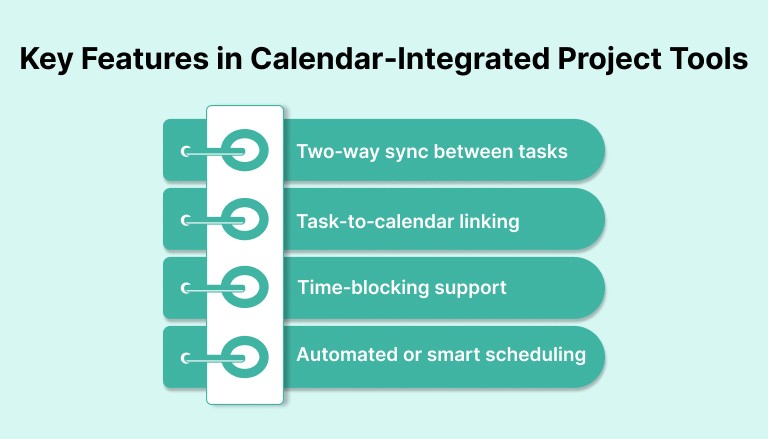
Key Features in Calendar‑Integrated Project Tools
When you pick project‑management software that links with Google Calendar, you should expect more than just simple sync. The right tools bring together scheduling and task tracking in one place.
Teams using dedicated project‑management tools complete tasks up to 30 % faster than those who don’t which is a boost worth noting.
1. Two‑way sync between tasks and calendar
Updates in the project tool (tasks, deadlines, events) automatically show up in Google Calendar, and edits in the calendar reflect back in the tool.
That keeps your schedule and task list aligned without manual copying. This reduces the risk of mismatched dates or forgotten tasks.
2. Task-to‑calendar linking
You should be able to turn project tasks, deadlines, and milestones into calendar events. That way, you get visibility of both meetings and task deadlines in the same view. According to a 2025 list of top calendar‑integrated PM tools, this helps consolidate schedules and reduce overlap or conflicts.
3. Time‑blocking support
Good tools let you block out time for focused work or tasks directly from the project interface. With that you avoid context switching, treat work sessions like real appointments, and make sure tasks and work time coexist smoothly.
4. Automated or smart scheduling
Some tools go beyond basic sync, they also help assign tasks or meetings based on team availability, workload, or deadlines. That helps you avoid overcommitting, and ensures deadlines and resources stay realistic.
Also Read: 10 Key Organizational Skills to Grow Your Career
How to Evaluate the Best Project‑Management Software with Google Calendar Integration
Before you pick a tool, it helps to check how strong the calendar integration really is. The quality of the integration often decides whether the software will reduce friction or just add another step to your workflow.
Look for these key features when choosing the best tool for integration:
Feature | What to Look For |
Simple and Intuitive Interface | Easy connection between Google Calendar and project management tool, with side-by-side viewing of tasks and events. |
Flexible Settings and Customization | Ability to customize sync options, notifications, and settings to fit your team’s workflow. |
Mobile Access | Ensure the tool and calendar sync are fully functional on mobile devices. |
Support for Multiple Calendars | Ability to manage individual, team, and project calendars, with options to filter or view separately. |
Reliable Two-Way Sync | Sync should be automatic, reflecting changes across Google Calendar and the project management tool. |
Akiflow, for example, offers seamless two-way sync and customizable settings, ensuring tasks from various apps are automatically integrated into your calendar, streamlining workflow management.
Also Read: AI To-Do Lists: Smarter Way to Get Work Done
Let’s take a look at real-world examples to understand how companies are successfully using Google Calendar integration to streamline their project management
Case Studies: Successful Project Management With Google Calendar Integration
Real‑world examples show how calendar‑integrated tools help teams coordinate work better and avoid scheduling problems.
Example 1 — Smaller Teams and Simple Projects
For example, a small business could connect its project-management tool to Google Calendar to view client meetings, project tasks, and deadlines together. This is an illustrative workflow, not a reported customer case study. The team would still need to check sync settings and keep task dates current.
Tools like this turn Google Calendar from a simple scheduling app into a central project hub.
Example 2 — Larger Teams with Complex Scheduling Needs
A recent report from AutoSuite found that organizations using shared team calendars experienced a 40% increase in collective efficiency and a 25% reduction in missed deadlines. Teams saved 50 minutes per day on average, which adds up to 11.3 hours per week previously lost in scheduling conflicts.
This integration improved visibility, reduced resource clashes, and allowed for better workload distribution, especially for teams across multiple projects and time zones.
Concrete Gains Reported
Reduced scheduling conflicts : Fewer missed deadlines thanks to real‑time task‑to‑calendar sync.
Better resource planning: Managers get a clear overview of team availability before assigning tasks, useful for avoiding burnout or overload.
Also Read: 16 Key Success Metrics to Track and Measure Business Performance
Top Tools With Google Calendar Integration for Project Management
For effective project management, Google Calendar integration is a must. It allows you to sync tasks, meetings, and deadlines into one unified platform, eliminating the need to switch between multiple tools.
A strong integration provides seamless two-way sync, giving you a clear view of both tasks and calendar events in one place.
Here are some of the leading project‑management platforms that integrate with Google Calendar:
Tool | What It Offers With Google Calendar Integration |
| |
ClickUp |
|
Asana |
|
Wrike |
|
Trello (with Calendar Power‑Up) |
|
Also Read: ADHD Habit Trackers: How to Build Consistency Without Overwhelm
Conclusion
In recent years, more teams have adopted such integrated tools: by combining scheduling and task tracking, these tools help prevent missed deadlines and reduce the friction of switching between different apps.
Looking ahead, the value of this integration will only grow. As remote and hybrid work become more common, shared and synced calendars give teams real‑time visibility into availability, deadlines, and workloads, which helps avoid overlaps and miscommunication.
Want to streamline your workflow? Akiflow integrates tasks, meetings, and deadlines into a single dashboard, making it easier to manage everything from one place.
Get a free demo now and see how seamlessly your tasks and calendar can sync, so you can focus on what matters most.
FAQs
Q: How does two-way sync between Google Calendar and project management tools improve workflow?
A: Two-way sync ensures that updates made in either Google Calendar or the project management tool are automatically reflected in both. This minimizes errors, keeps schedules accurate, and ensures that teams are always on the same page without needing to manually update both platforms.
Q: Can Google Calendar integration help in managing multiple projects at once?
A: Yes, Google Calendar integration makes it easy to manage multiple projects by providing a consolidated view of tasks, deadlines, and meetings across all projects. This reduces the risk of missing critical deadlines and ensures better time allocation.
Q: How do calendar integrations affect task prioritization?
A: Calendar integrations allow you to visually align tasks with deadlines and meeting schedules. This clear view helps prioritize tasks based on urgency, ensuring that the most important tasks are completed first and on time.
Q: Are there any limitations when integrating Google Calendar with project management software?
A: Some project management tools may have limitations with specific calendar features or may not support complex customizations. It’s important to choose a tool that fits your team’s specific needs and allows for full integration with Google Calendar.
Q: Can Google Calendar integration improve project delivery time?
A: Yes, by synchronizing tasks with calendar events, teams can better allocate time for focused work, avoid scheduling conflicts, and stay on track with deadlines. This level of organization reduces delays and improves overall project delivery times.


