
Summary
Pull tasks from email, Slack, notes, and project tools into one inbox, then place priority work on your calendar so focus blocks survive the day.
Match the template to the day you actually have: deep work, meeting-heavy, weekly founder rhythm, creative sprint, or a responsive morning built around quick wins.
Make the system repeatable with recurring focus blocks, meeting buffers, and a daily wrap-up that reschedules unfinished work into realistic next slots.
Many professionals can reclaim one to two hours per day simply by restructuring how their schedule flows. Not by hustling harder. Not by downloading another shiny app. Just by restructuring how your day flows. Most professionals don’t struggle with ambition; they struggle with scattered calendars, endless notifications, and a to-do list that never turns into scheduled work.
The real issue isn’t effort; it’s fragmentation. Tasks are spread across email, Slack, notes, and project tools, while your calendar tells a different story. Without structure, priorities shift, and deep work vanishes. A simple schedule template can instantly reduce decision fatigue and restore clarity to your day.
In this post, you will learn five practical time management schedule templates, when to use each one, how to apply them to your calendar and task inbox, and how to turn them into repeatable systems that truly stick.
Why Templates Beat Ad Hoc Scheduling?
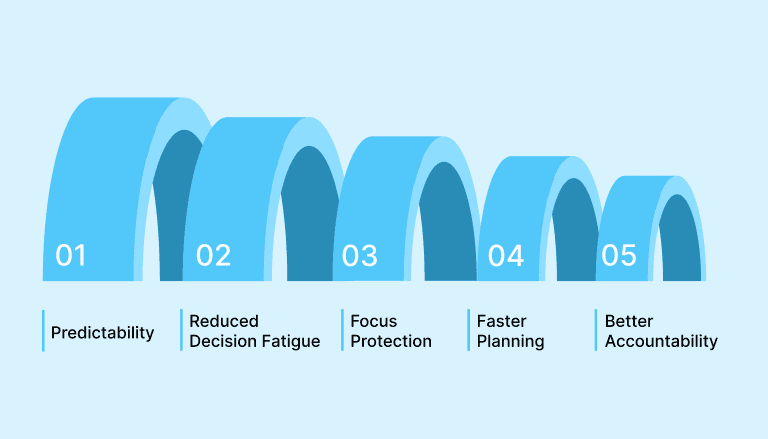
Templates remove the daily guesswork by providing a repeatable structure you can trust for your day. They reduce the small decisions that drain willpower, make priorities visible at a glance, and let you reserve mental energy for high-value work instead of planning. Use these benefits when choosing or building a template:
Predictability: Templates create consistent routines, allowing you to spend less time deciding what to do next and more time actually doing it.
Reduced Decision Fatigue: Predefined blocks cut the number of choices each day, preserving willpower for important tasks.
Focus Protection: Dedicated deep work slots preserve uninterrupted time.
Faster Planning: Copying and adjusting a template is faster than building a schedule from scratch, so planning becomes a five-minute habit.
Better Accountability: Visible time blocks make progress measurable and simplify daily and weekly reviews.
Also Read: 10+ Daily Activities That Improve Productivity and Focus in 2026
How To Use These Templates With Your Calendar And Task Inbox?
A schedule template only works when your tasks and calendar live in the same system. If your to-dos are scattered across email, chat, and multiple apps, time blocking becomes frustrating instead of helpful. The goal is simple: centralize first, then plan with intention.
Follow these practical steps to apply any template effectively:
Import Everything Into One Inbox: Collect tasks from email, Slack, project tools, and notes into a single inbox so nothing gets lost before planning.
Clarify and Prioritize Tasks: Assign priorities, due dates, or tags so you know what deserves protected time on your calendar.
Map Tasks to Time Blocks: Drag important tasks directly into dedicated calendar slots instead of relying on a loose to-do list.
Reserve Focus Windows: Block uninterrupted time for deep work and treat it as a real meeting with yourself.
Review Daily And Adjust: Spend five minutes at the end of each day moving unfinished tasks and refining tomorrow’s schedule.
Using a task-calendar integration tool like Akiflow makes this process easier by allowing you to schedule tasks directly into available calendar slots from a unified inbox.
Time Management Schedule Examples You Can Use Immediately
The time management schedule template is designed to help you plan, prioritize, and track your daily activities with clarity and intention. It provides a structured framework to allocate time effectively across work, personal tasks, breaks, and self-care, reducing overwhelm and improving focus. Teams that standardize these templates across a department sometimes publish the set as a shareable digital booklet that new hires can browse during onboarding.
By visualizing your day in advance, the template supports better decision-making, minimizes procrastination, and encourages a balanced routine that aligns with both short-term responsibilities and long-term goals.
Let’s look at the template in detail.
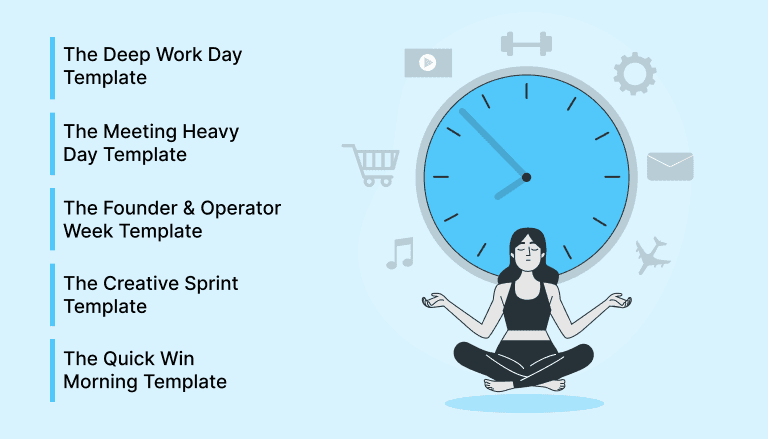
Template 1: The Deep Work Day Template
This template is designed to protect long, uninterrupted focus sessions for complex, high-impact work. It works best for founders, operators, developers, and students who need to research and write a paper, or creators who need extended concentration without constant meetings or context switching throughout the day.
Here is a practical structure you can copy into your calendar:
08:00 Review and Plan: Scan your inbox, confirm top priorities, and assign tasks to specific time blocks.
09:00 to 12:00 Deep Work Block: Work on your most cognitively demanding task with no meetings, messages, or email.
12:00 Lunch and Reset: Step away from your screen to recharge and avoid mental fatigue.
13:00 to 15:00 Shallow Tasks: Handle emails, admin, coordination, and smaller action items that require less focus.
15:30 Meeting Window: Schedule calls and collaborative sessions inside a defined window to prevent fragmentation.
17:00 Daily Wrap-Up: Review progress, reschedule unfinished tasks, and outline tomorrow’s top priority.
To implement this effectively, mute non-essential notifications during deep work and set your status to unavailable. Move reactive tasks into the shallow work block instead of addressing them immediately. Create recurring deep work blocks on specific weekdays and use consistent color coding so focus time stands out visually on your calendar.
Template 2: The Meeting Heavy Day Template
Some days are packed with calls, reviews, and team syncs. Instead of letting meetings consume your entire schedule, this template helps you cluster conversations efficiently while still protecting at least one meaningful focus block for important individual work.
Use the following structure to organize a meeting-heavy day:
08:00 Planning and Preparation: Review your calendar, confirm agendas, and define one critical task that must get done today.
09:00 to 11:30 Meeting Block One: Group internal syncs or recurring team calls into a single cluster to minimize fragmentation.
11:30 Buffer and Notes: Reserve 15 to 30 minutes to document decisions, assign tasks, and reset before the next block.
13:00 to 14:00 Guaranteed Focus Slot: Protect one non-negotiable deep work window, even if it is shorter than usual.
14:00 to 16:30 Meeting Block Two: Schedule external calls, client meetings, or collaborative reviews in a second dedicated cluster.
16:30 Wrap and Follow-Ups: Batch email responses, send summaries, and move action items into future time blocks.
To make this work, insist on clear agendas and decline meetings without defined outcomes. Batch preparation for similar meetings together and always include buffers to prevent spillover from disrupting your focus slot.
Template 3: The Founder And Operator Week Template
Founders and operators rarely have predictable days, but they do benefit from a predictable weekly structure. This template balances strategy, execution, and team coordination while protecting space for deep work. It creates rhythm without removing flexibility, which is essential in fast-moving environments.
Use this Monday to Friday structure as your baseline:
Monday Strategy and Weekly Review: Conduct a 60-minute review of metrics, goals, and priorities. Define three outcomes that must be achieved by Friday.
Tuesday Deep Work Focus: Reserve extended blocks for product thinking, roadmap decisions, writing, or high-leverage projects. Avoid unnecessary meetings.
Wednesday Team and Sync Day: Schedule team meetings, one-on-ones, and cross-functional discussions inside defined windows.
Thursday Sales and Operations: Focus on revenue activities, partnerships, hiring conversations, and operational improvements.
Friday Reflection and Planning: Review completed work, reassign unfinished tasks, and plan next week’s top objectives.
At the start of each day, drag unfinished tasks into the next appropriate block instead of letting them float in your inbox. Keep weekly goals visible at the top of your task list or pinned in your planning tool. If urgent priorities arise midweek, replace a lower-impact block instead of stacking additional tasks onto an already full schedule.
Also Read: How to Take Meeting Notes That Boost Team Productivity?
Template 4: The Creative Sprint Template
Creative work thrives on intensity and clarity, not endless open-ended time. This template is built for designers, developers, and builders who need short, focused bursts of ideation followed by execution and structured feedback. It prevents overthinking while ensuring progress happens every day.
Use this sprint-based structure to shape your day:
Sprint Planning Session: Define one clear outcome for the sprint, such as shipping a feature draft or completing a design iteration.
Ideation Block: Spend 30 to 60 minutes brainstorming, sketching, or outlining without editing yourself too early.
Execution Sprint: Work in a 60- to 90-minute focused session to turn ideas into tangible output.
Review and Refine: Allocate dedicated time to test, debug, polish, or critique your own work before sharing it.
Feedback Window: Schedule a short collaborative slot to gather input from teammates instead of interrupting your deep focus time.
Sprint Retrospective: End the day by noting what worked, what slowed you down, and what to improve in the next sprint.
Pair collaborative discussions right after a sprint, not during it. Protect execution time by silencing notifications and clustering feedback sessions into defined windows.
Template 5: The Quick Win Morning Template
Some roles demand constant responsiveness. If you handle support, operations, or client communication, starting the day reactively can feel inevitable. This template channels that energy into a controlled system so your inbox does not control the rest of your schedule.
Follow this structured morning approach:
Inbox Sweep: Spend 20 to 30 minutes clearing urgent emails and messages, deleting or delegating immediately when possible.
Task Capture and Categorization: Convert actionable messages into tasks with clear priorities and due dates.
Top Three Selection: Identify the three most important outcomes for the day before opening new conversations.
Short Focus Block: Reserve at least one 45- to 60-minute session for meaningful progress on a priority task.
Scheduled Response Windows: Define two or three later check-in times instead of reacting to every notification instantly.
Midday Reset: Reassess workload and move unfinished tasks into realistic time slots.
This time management schedule example helps you stay responsive without sacrificing progress on high-value priorities.
Conclusion
As you start using these schedule templates, you will notice routines replace random task handling, and clarity replaces overwhelm. Templates help align your priorities with your commitments, so deep work finally gets space instead of slipping through the cracks.
Whatever your role, from founder to team lead to individual contributor, planning transforms good intentions into real outcomes.
If you want a simple way to centralize your calendar and task inbox while applying these templates, try Akiflow free for 7 days. It unifies your tasks and calendar into one planning view, making it easier to apply these schedule examples consistently.
Frequently Asked Questions
How do you choose the right schedule template for your day?
Choose based on the work you cannot afford to lose. Use the deep work format for long concentration, the meeting-heavy format when calls dominate, the founder and operator week when you need rhythm across changing priorities, the creative sprint for short bursts, and the quick win morning when responsiveness is unavoidable.
How do you make time blocking work when tasks are scattered everywhere?
Start by collecting tasks from email, Slack, project tools, and notes into one inbox. Clarify priorities, then drag the important tasks into dedicated calendar slots instead of leaving them on a loose list. Reserve focus windows like real meetings, and spend five minutes at the end of the day moving unfinished work into tomorrow.
What does a practical deep work day look like?
Use a simple rhythm: review and plan at 08:00, protect 09:00 to 12:00 for your most demanding task, take lunch away from the screen, handle shallow tasks from 13:00 to 15:00, keep meetings in a defined window, and finish with a daily wrap-up. During deep work, mute non-essential notifications and avoid reactive checking.
How do you stop meetings from taking over the entire day?
Cluster meetings into two blocks, leave a buffer after the first cluster for notes and reset time, and defend one guaranteed focus slot even on busy days. Ask for clear agendas, decline meetings without defined outcomes, and batch preparation for similar conversations so spillover does not consume the rest of the day.
What should you do when urgent work disrupts the schedule?
When urgent work hits, do not stack it on top of a full schedule. Move unfinished tasks into the next appropriate block, use buffers and a daily wrap ritual, and decide whether the new work is urgent now, should be scheduled today, or can wait in the backlog. Midweek changes should replace a lower-impact block, not overload the day.


