Summary
TickTick combines tasks, habits, calendar views and a Pomodoro timer; Akiflow emphasizes collecting commitments from work systems and fitting them around appointments.
If your important tasks already live in TickTick, another planner may create duplication; evaluate whether collecting scattered work is actually the unresolved problem.
A proposal deadline does not reveal available work time. Reserve a realistic session around existing calls to expose a capacity conflict before committing.
Reviewed October 17, 2026. Published by Akiflow. This editorial comparison uses the official sources below; it is not an independent hands-on benchmark.
Comparison at a glance
Feature | Akiflow | TickTick |
|---|---|---|
Planning emphasis | Connected inbox and time blocks | Tasks, habits and focus sessions |
Apple Watch | Native task companion | Native Watch app |
iCloud Calendar | Direct two-way event connection | Calendar subscription supported |
Paid entry point | US$19/month billed yearly | US$49.99/year Premium |
Start with the problem you need to solve
A person who forgets recurring chores has a different need from someone who cannot find two uninterrupted hours for a client deliverable. TickTick combines several personal productivity tools; Akiflow focuses on bringing actionable work into a calendar-centered day. Both can organize tasks, but that overlap does not make their strongest use cases identical.
The deciding factor is often the work outside the app. If the important tasks are already in TickTick, adding a second planner can create duplication. If obligations are scattered across work systems, maintaining a single reliable list may be the harder part of planning.
Why you might stay with TickTick
TickTick documents recurring tasks, reminders, subtasks, shared lists, calendar views, habits and a Pomodoro timer. Premium expands capacity and adds features such as multiple calendar views and task duration. It is inaccurate to describe the current product as a simple list without a calendar or focus tools.
For someone organizing study, exercise and household responsibilities, that combination can be enough. The timer provides a starting signal, the habit tracker makes repetition visible, and the task list holds the next actions. None of these becomes less valuable because another application has a more elaborate task inbox.
Where Akiflow can improve the day
Akiflow is a stronger candidate when the same day must account for project assignments, messages and appointments. Its connected inbox and time-blocking workflow help you decide which commitments fit. The command bar and shortcuts are useful when a plan needs frequent small adjustments.
Consider an account manager who has three calls and a proposal to finish. A due date on the proposal does not show whether enough working time remains. Reserving a realistic session exposes the conflict early. The value of a planning subscription is that clearer decision, not the appearance of a busier calendar.
Apple support needs a precise comparison
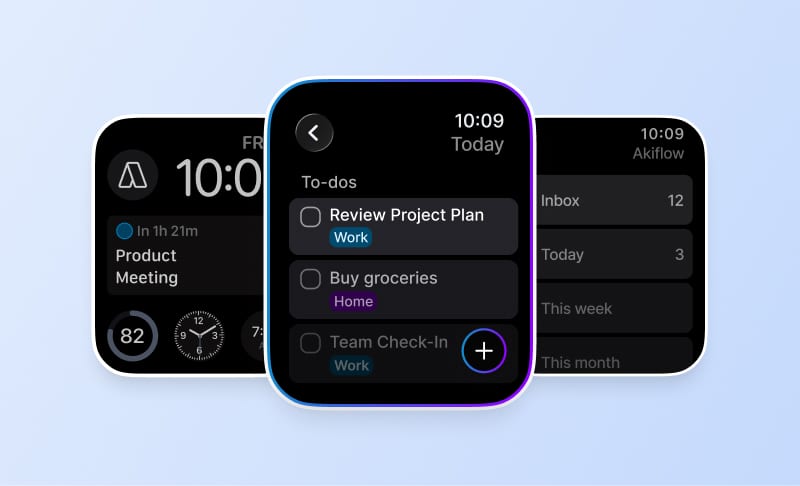
TickTick’s current App Store listing includes Apple Watch. Akiflow also has a Watch companion, so a native app is not an exclusive advantage. Test capture, completion and the specific view you expect to use. Do not infer that an action supported on a phone must also work from the wrist.
TickTick’s help lists local calendars, iCloud, Google, Outlook and other calendar subscription routes. Akiflow documents creating and changing iCloud events directly. An event visible through a subscription is not, by itself, proof that you can edit every field in the original account. Check the provider-specific route before making calendar editing the deciding factor.
Price matters here
TickTick’s current web upgrade page lists a free tier and Premium at US$49.99 per year. Akiflow lists US$34 per month or US$19 per month billed yearly. TickTick is substantially less expensive on those published plans. Store pricing, taxes and existing subscriptions can differ.
Try one working week before switching: use a recurring personal task, a long deliverable, a calendar appointment and an unexpected request. Track the time spent maintaining the system, not just completing tasks. Keep TickTick if its combined task and focus tools cover the need. Choose Akiflow when the improvement in cross-tool intake and calendar planning justifies the additional subscription cost.
Akiflow Apple setup limits
Akiflow’s Watch companion supports capture, completion and current/up-next information, not task editing or rescheduling. It requires watchOS 10+ and a paired iPhone running Akiflow 2.83+. Its iCloud connection handles events, not Apple Reminders. Lock a task or Time Slot to publish it to an editable calendar; merely scheduling it does not export it. Sync is periodic, and calendar permissions still apply.
Setup and limitations: Akiflow Apple Watch guide; Akiflow iCloud Calendar guide.
Official sources
Frequently Asked Questions
When is keeping TickTick the more practical choice?
Keep it under consideration when your important tasks already live there and its combination of task lists, habits and focus tools covers your needs. Adding another planner can create duplicate maintenance. For study, exercise and household responsibilities, evaluate whether the existing system is sufficient before paying for a separate planning workflow.
What would justify adding a calendar-centered planner?
Look for work that is difficult to assemble or fit into the day. Project assignments, messages and appointments may compete for the same hours. For an account manager with three calls and a proposal, reserving a realistic work session reveals a constraint that the proposal’s due date alone does not show.
Would Akiflow replace TickTick’s habit tracker and Pomodoro timer?
Do not assume a like-for-like replacement. TickTick explicitly combines habit tracking and a Pomodoro timer with task management. Evaluate Akiflow for collecting work and planning time, rather than assuming it matches every tool in TickTick. A more elaborate task inbox does not make the habit and timer features less useful to someone who relies on them.
What should I check before relying on iCloud calendar editing?
TickTick documents calendar subscription routes, including iCloud, while Akiflow documents direct iCloud event changes. Visibility through a subscription does not prove that every field can be edited in the original account. Check the provider-specific connection and the particular operation you need before making calendar editing the deciding factor.
What should a one-week comparison include?
Use a recurring personal task, a long deliverable, an appointment and an unexpected request during one working week. Track how much time you spend maintaining the system as well as completing work. Assess whether cross-tool task intake and calendar planning solve enough of a problem to justify adding another subscription.