Reviewed October 17, 2026. Published by Akiflow. This comparison is based on the official documentation linked below, not a hands-on benchmark or an independent review.
Apple Watch and iCloud comparison
| Feature | Akiflow | Superhuman Mail |
|---|---|---|
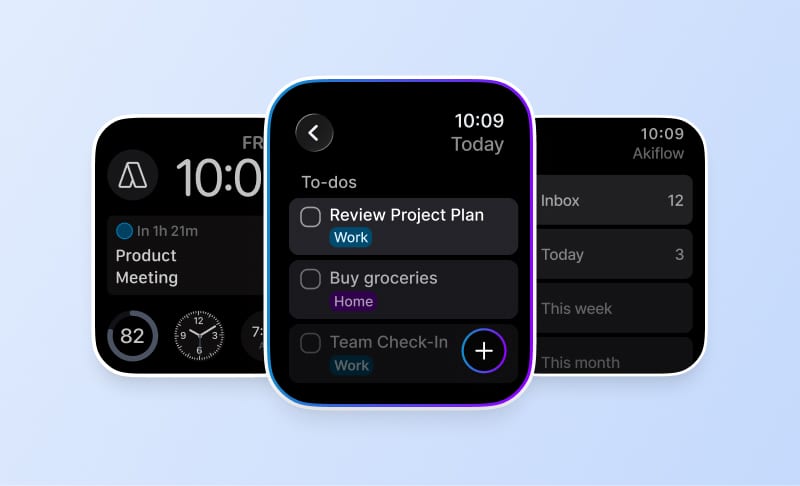
| Apple Watch | Native capture and completion | Not confirmed in reviewed docs |
| iCloud Calendar | Direct two-way event connection | Google/Microsoft calendars documented |
A native Superhuman Mail Watch app was not established by the reviewed official documentation. Check current platform support before relying on wrist-based email actions. Superhuman Mail’s calendar documentation focuses on Google and Microsoft calendars. Its supported mail-account documentation is separate from iCloud Calendar support; do not conflate mail hosting and calendar synchronization.
Reviewed October 17, 2026. Native Watch apps, mirrored notifications, task-data sync and calendar subscriptions are different capabilities. Unconfirmed means the reviewed sources do not establish support, not that the feature is necessarily unavailable.
Official evidence: Superhuman Mail source 1; Superhuman Mail source 2. Akiflow Watch documentation; Akiflow iCloud documentation.
The difference that matters
An email can be answered immediately, archived or turned into a longer commitment. Improving the inbox experience helps with message handling. A planner becomes valuable when messages generate work that cannot be completed during the email session.
What this looks like in a real workday
A client asks for a revised presentation. Sending a quick acknowledgment may clear the conversation temporarily, but the revision still needs an hour. A good workflow distinguishes “reply sent” from “work completed” and puts the latter into the day.
Where the trade-offs are
Do not compare Superhuman Mail with every capability offered elsewhere under the Superhuman brand. This article concerns the email product. It also does not imply that Akiflow replaces a full email client.
Apple Calendar and Apple Watch
Superhuman Mail: calendar support
Superhuman Mail’s calendar documentation focuses on Google and Microsoft calendars. Its supported mail-account documentation is separate from iCloud Calendar support; do not conflate mail hosting and calendar synchronization.
Superhuman Mail: Apple Watch
A native Superhuman Mail Watch app was not established by the reviewed official documentation. Check current platform support before relying on wrist-based email actions.
Akiflow: iCloud events and wrist-based capture
Akiflow connects directly to iCloud Calendar. Event changes can sync in both directions, subject to calendar permissions. Scheduling a task does not automatically export it: use Lock to publish a task or Time Slot to an editable calendar. Calendar updates are periodic, not an instant-sync guarantee.
The Apple Watch companion supports task capture by text or dictation, completion and reopening, and views of what is current or next. It requires watchOS 10 or later and a paired iPhone running Akiflow 2.83 or later. It is not a full scheduling editor: Aki, natural-language scheduling, and task editing, rescheduling or deletion are not available on the Watch.
See the iCloud Calendar guide and Apple Watch guide for setup and limits. The Akiflow fall update also covers Travel Time and the desktop redesign.
How to make the decision
Process a message that creates substantial work. Check how reliably the follow-up becomes a task with a realistic work period instead of remaining a promise inside the inbox.
Before changing systems, use a normal busy day rather than an empty demo calendar. Include one changed meeting, one task that takes longer than expected and one new commitment. A useful workflow should make the resulting trade-offs clear without requiring you to maintain conflicting copies of the same work.
Cost and buying considerations
Compare the plan that includes the features you actually need, the billing period, and whether the cost is per person or per workspace. Do not treat a calendar subscription, a native app and a two-way integration as interchangeable paid features.
Check Akiflow’s current pricing before purchasing. This article does not reproduce old promotional prices or unsupported star ratings.
Official sources
Frequently Asked Questions
Can Akiflow replace Superhuman Mail as my email client?
That is not the comparison to make. Superhuman Mail focuses on handling email, while Akiflow focuses on tasks and calendar-based planning. A planner can address work created by messages without replacing the email client itself. Decide whether your difficulty is processing the conversation or reserving time for the commitment it creates.
Why can an inbox look clear while important work remains unfinished?
An acknowledgment can temporarily resolve the conversation without completing the underlying request. For example, replying to a client about a revised presentation is different from spending the hour needed to revise it. Keep the distinction between replying and finishing the work visible, and give that longer commitment a place in the day.
When does email follow-up need calendar planning?
An email may be answered immediately, archived or converted into a longer commitment. Planning becomes relevant when the work cannot be completed during the email session. In that case, evaluate whether the follow-up becomes a task with a realistic work period instead of remaining only a promise inside the inbox.
What should I verify about calendar accounts in this comparison?
Check the calendar provider rather than assuming that an email product supports every calendar account you use. Superhuman Mail documents Google and Microsoft calendar connections. Akiflow’s direct iCloud connection concerns calendar events, not email hosting. These are separate compatibility questions, so identify the account and the action your workflow actually requires.
Should capabilities elsewhere under the Superhuman brand influence this choice?
Keep the comparison scoped to Superhuman Mail. Features offered elsewhere under the Superhuman brand do not automatically belong to its email product. The practical distinction here is handling messages versus planning the work they generate; it does not establish that Akiflow replaces a full email client or every other Superhuman product.