Reviewed October 17, 2026. Published by Akiflow. This comparison is based on the official documentation linked below, not a hands-on benchmark or an independent review.
Apple Watch and iCloud comparison
| Feature | Akiflow | Saner.AI |
|---|---|---|
| Apple Watch | Native capture and completion | Not confirmed in reviewed docs |
| iCloud Calendar | Direct two-way event connection | Direct iCloud not confirmed |
A native Saner.AI Apple Watch app was not established by the official guide reviewed. Confirm current availability before making it part of your workflow. The reviewed Saner.AI guide documents Google Calendar connectivity. It does not establish a direct iCloud Calendar connection; Apple Notes import is a different feature.
Reviewed October 17, 2026. Native Watch apps, mirrored notifications, task-data sync and calendar subscriptions are different capabilities. Unconfirmed means the reviewed sources do not establish support, not that the feature is necessarily unavailable.
Official evidence: Saner.AI source 1. Akiflow Watch documentation; Akiflow iCloud documentation.
The difference that matters
Capturing information and deciding how to act on it are separate steps. An assistant can help organize material, but a commitment still needs a clear action and enough time. Choose the product that addresses the step you currently struggle to complete.
What this looks like in a real workday
A voice note after a meeting may contain ideas, background and two actual obligations. A notes-oriented assistant can help interpret that material. A planner should make the resulting obligations visible against the meetings and work already in your calendar.
Where the trade-offs are
Apple Notes import is not Apple Calendar synchronization. Similarly, an AI capability does not establish that an app can perform every action autonomously. Check the exact connector and supported action rather than relying on broad automation claims.
Apple Calendar and Apple Watch
Saner.AI: calendar support
The reviewed Saner.AI guide documents Google Calendar connectivity. It does not establish a direct iCloud Calendar connection; Apple Notes import is a different feature.
Saner.AI: Apple Watch
A native Saner.AI Apple Watch app was not established by the official guide reviewed. Confirm current availability before making it part of your workflow.
Akiflow: iCloud events and wrist-based capture
Akiflow connects directly to iCloud Calendar. Event changes can sync in both directions, subject to calendar permissions. Scheduling a task does not automatically export it: use Lock to publish a task or Time Slot to an editable calendar. Calendar updates are periodic, not an instant-sync guarantee.
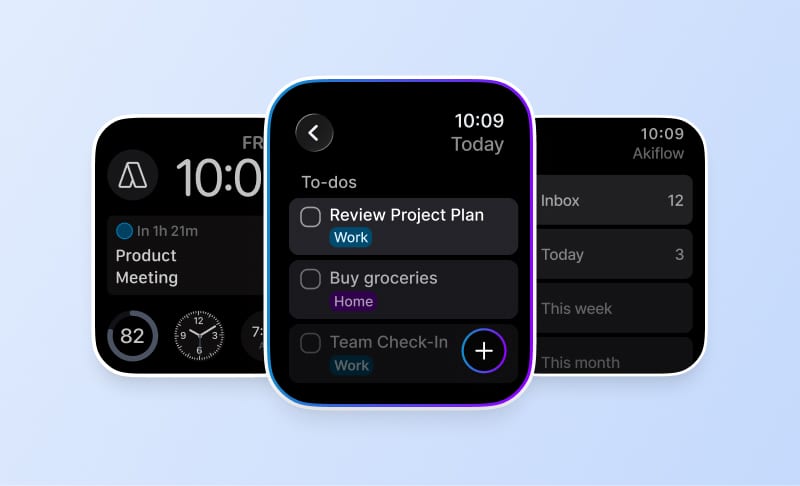
The Apple Watch companion supports task capture by text or dictation, completion and reopening, and views of what is current or next. It requires watchOS 10 or later and a paired iPhone running Akiflow 2.83 or later. It is not a full scheduling editor: Aki, natural-language scheduling, and task editing, rescheduling or deletion are not available on the Watch.
See the iCloud Calendar guide and Apple Watch guide for setup and limits. The Akiflow fall update also covers Travel Time and the desktop redesign.
How to make the decision
Capture a messy meeting note, identify the next actions and schedule one realistic work session. Evaluate the result rather than the assistant’s conversational fluency.
Before changing systems, use a normal busy day rather than an empty demo calendar. Include one changed meeting, one task that takes longer than expected and one new commitment. A useful workflow should make the resulting trade-offs clear without requiring you to maintain conflicting copies of the same work.
Cost and buying considerations
Compare the plan that includes the features you actually need, the billing period, and whether the cost is per person or per workspace. Do not treat a calendar subscription, a native app and a two-way integration as interchangeable paid features.
Check Akiflow’s current pricing before purchasing. This article does not reproduce old promotional prices or unsupported star ratings.
Official sources
Frequently Asked Questions
How do I decide whether I need note assistance or a planner?
Separate capturing information from deciding how to act on it. If messy material prevents you from identifying commitments, a notes-oriented assistant may address that step. If the actions are already clear but lack room in the day, calendar planning is the more relevant problem. Each commitment still needs a clear action and enough time.
What should I test with a messy meeting note?
Capture a note containing ideas, background information and actual obligations. Identify the next actions, then schedule one realistic work session. Evaluate whether the resulting commitments are clear and fit around existing work. Conversational fluency alone is not the test: the useful result is an actionable obligation with time available to carry it out.
Does importing Apple Notes establish Apple Calendar compatibility?
No. Importing notes concerns stored information, while calendar synchronization concerns calendar data. Apple Notes import does not establish an Apple Calendar connection. Check the exact connector and supported action you need before choosing a setup, rather than assuming that support for one Apple service extends to the others.
Does an AI feature mean the assistant can carry out every task?
No. An AI capability does not establish that every action can be performed autonomously. Check the supported action rather than relying on broad automation language. Organizing captured material is also different from carrying out an obligation: the resulting commitment still needs a clear next action and sufficient time in the schedule.
Can I dictate a task and schedule it entirely from Akiflow on Apple Watch?
The Watch companion can capture task text through dictation, but that is not natural-language scheduling. It supports quick capture, completion and checking current or upcoming work; editing and rescheduling tasks require the main app. Treat wrist-based capture as recording a commitment to plan later, not as completing the full scheduling step.