Akiflow vs Clockwise: Planning After the Clockwise Shutdown

3

Reviewed October 17, 2026. Published by Akiflow. This is an editorial comparison based on the official sources linked below, not an independent hands-on benchmark.
Summary
Clockwise is no longer a current buying option: its official notice says the product became unavailable on March 27, 2026. Akiflow can support personal planning, but should not be described as a complete replacement for every former Clockwise team workflow.
Apple Watch and iCloud comparison
Feature | Akiflow | Clockwise |
|---|---|---|
Apple Watch | Native capture and completion | Service discontinued |
iCloud Calendar | Direct two-way event connection | Service discontinued |
Clockwise's official shutdown notice means historical Watch and calendar features should not be treated as available purchasing options. Evaluate an active replacement for meeting automation separately from the personal task-planning workflow.
Reviewed October 17, 2026. Native Watch apps, mirrored notifications, task-data sync and calendar subscriptions are different capabilities. Unconfirmed means the reviewed sources do not establish support, not that the feature is necessarily unavailable.
Official evidence: Clockwise source 1. Akiflow Watch documentation; Akiflow iCloud documentation.
What changed
Clockwise announced that its team was joining Salesforce. The shutdown notice describes the end of flexible-meeting movement and scheduling links, alongside removal of managed calendar holds. Historical prices and old feature tables are not a valid current comparison.
Source: Clockwise official product information.
Where Akiflow fits
Akiflow brings tasks and calendars into a personal planning workflow. Its useful role is to make the relationship between commitments and available time visible: collect actionable work, choose what matters, and reserve time around existing events. It is not a substitute for every specialized workflow in another product.
A practical decision scenario
Start by checking the calendar you use today. Identify which focus blocks, booking links and team rules depended on Clockwise. Recreate only the personal commitments you still need, then make a separate decision about team-wide meeting optimization.
Trade-offs to consider
A manual personal plan does not automatically reproduce a team scheduling engine. Communicate any changed booking process to colleagues and replace obsolete links. Do not suggest that readers sign up for a discontinued product.
iCloud Calendar and Apple Watch in Akiflow
Akiflow now connects directly to iCloud Calendar. Event changes can sync in both directions, subject to calendar permissions. Scheduling a task does not automatically export it as an event: use Lock to publish a task or Time Slot to an editable calendar. Updates are periodic rather than a promise of instant synchronization.
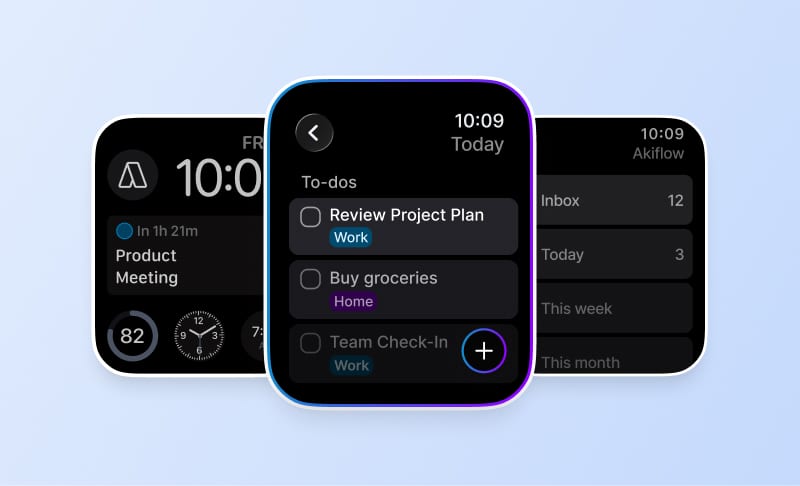
The Apple Watch companion supports task capture by text or dictation, completion and reopening, and checking what is current or next. It requires watchOS 10 or later and a paired iPhone running Akiflow 2.83 or later. Use the main app for editing, rescheduling or deleting tasks. The Watch does not provide Aki or natural-language scheduling.
Read the iCloud setup guide and Apple Watch guide for the supported workflow and its limits. The fall product update also explains Travel Time and the desktop redesign. These are Akiflow capabilities, not claims that the other product lacks every equivalent feature.
Before switching
Test with a real calendar account and a small set of non-sensitive tasks before moving your whole workflow. Include a changed appointment, an unfinished task and a new commitment. Check what synchronizes, what stays local and which system owns completion. A short successful demo does not establish reliability for every account or device.
Do not use historical Clockwise subscription prices to make a current buying decision. Assess the replacement workflows separately.
FAQ
How do Clockwise and Akiflow compare for Apple devices?
Clockwise's official shutdown notice means historical Watch and calendar features should not be treated as available purchasing options. Evaluate an active replacement for meeting automation separately from the personal task-planning workflow.
Can I still choose Clockwise instead of Akiflow?
Clockwise is no longer a current buying option: its official notice says the product became unavailable on March 27, 2026. Akiflow can support personal planning, but should not be described as a complete replacement for every former Clockwise team workflow.
Does connecting iCloud Calendar also import Apple Reminders?
No. The Akiflow connection is for calendar events. It does not import Apple Reminders, Apple Mail or calendars stored only on a device.
Can I manage the whole schedule from Akiflow on Apple Watch?
No. Use it for quick capture, completion and checking what is next. Editing tasks and reorganizing the schedule remain main-app workflows.