Akiflow vs Microsoft To Do: Task Lists or Calendar-Based Execution?

4

Summary
Microsoft To Do organizes personal commitments; calendar-based planning addresses when to do them. A task due Friday may require reserved work time earlier in the week.
Microsoft documents Apple Watch access through Apple Reminders and an Outlook or Exchange account, which is distinct from a standalone Microsoft To Do Watch app.
Before adding a planning subscription, estimate one upcoming task’s work time and decide whether a reminder alone is enough to prepare before its deadline.
Reviewed October 17, 2026. Published by Akiflow. This comparison is based on the official documentation linked below, not a hands-on benchmark or an independent review.
Apple Watch and iCloud comparison
Feature | Akiflow | Microsoft To Do |
|---|---|---|
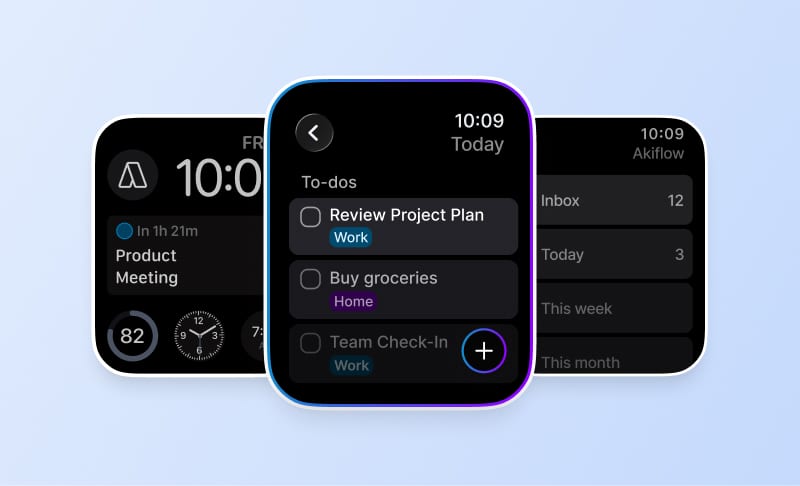
Apple Watch | Native capture and completion | Via Apple Reminders |
iCloud Calendar | Direct two-way event connection | Direct event editing not confirmed |
Microsoft documents accessing tasks on Apple Watch through Apple Reminders after connecting the relevant Outlook or Exchange account. That is different from a standalone Microsoft To Do Watch app. Microsoft To Do is a task service. The documentation reviewed does not establish a direct iCloud event-editing connection equivalent to Akiflow’s calendar integration.
Reviewed October 17, 2026. Native Watch apps, mirrored notifications, task-data sync and calendar subscriptions are different capabilities. Unconfirmed means the reviewed sources do not establish support, not that the feature is necessarily unavailable.
Official evidence: Microsoft To Do source 1. Akiflow Watch documentation; Akiflow iCloud documentation.
The difference that matters
A due date and a work appointment mean different things. A task due Friday may require two hours on Tuesday. Microsoft To Do organizes commitments; Akiflow helps you make room for them before the deadline. You do not necessarily need to replace a task system to improve your daily planning.
What this looks like in a real workday
For a short list of errands and follow-ups, a dedicated planning subscription may be unnecessary. For someone balancing client work, meetings and incoming requests, choosing the next task from a long list can be harder than maintaining a calendar-based plan.
Where the trade-offs are
An Apple Watch workaround is not the same as a native Watch application. Microsoft documents a route through the Apple Reminders account connection. Check which lists and actions are available in that setup rather than assuming desktop or iPhone behavior carries over.
Apple Calendar and Apple Watch
Microsoft To Do: calendar support
Microsoft To Do is a task service. The documentation reviewed does not establish a direct iCloud event-editing connection equivalent to Akiflow’s calendar integration.
Microsoft To Do: Apple Watch
Microsoft documents accessing tasks on Apple Watch through Apple Reminders after connecting the relevant Outlook or Exchange account. That is different from a standalone Microsoft To Do Watch app.
Akiflow: iCloud events and wrist-based capture
Akiflow connects directly to iCloud Calendar. Event changes can sync in both directions, subject to calendar permissions. Scheduling a task does not automatically export it: use Lock to publish a task or Time Slot to an editable calendar. Calendar updates are periodic, not an instant-sync guarantee.
The Apple Watch companion supports task capture by text or dictation, completion and reopening, and views of what is current or next. It requires watchOS 10 or later and a paired iPhone running Akiflow 2.83 or later. It is not a full scheduling editor: Aki, natural-language scheduling, and task editing, rescheduling or deletion are not available on the Watch.
See the iCloud Calendar guide and Apple Watch guide for setup and limits. The Akiflow fall update also covers Travel Time and the desktop redesign.
How to make the decision
Take one task with a deadline next week and estimate its work time. Decide whether a reminder is enough or whether it needs a reserved block before the deadline.
Before changing systems, use a normal busy day rather than an empty demo calendar. Include one changed meeting, one task that takes longer than expected and one new commitment. A useful workflow should make the resulting trade-offs clear without requiring you to maintain conflicting copies of the same work.
Cost and buying considerations
Compare the plan that includes the features you actually need, the billing period, and whether the cost is per person or per workspace. Do not treat a calendar subscription, a native app and a two-way integration as interchangeable paid features.
Check Akiflow’s current pricing before purchasing. This article does not reproduce old promotional prices or unsupported star ratings.
Official sources
Frequently Asked Questions
How is a work appointment different from a task’s due date?
A due date identifies when a commitment must be finished, not when you will work on it. A task due Friday may need two hours on Tuesday. Microsoft To Do can organize the commitment while calendar-based planning addresses room for the work; improving that planning does not necessarily require replacing your task system.
Can Microsoft To Do tasks be visible on Apple Watch?
Microsoft documents a route through Apple Reminders after connecting the relevant Outlook or Exchange account. That should not be described as a standalone Microsoft To Do Watch app. Check which lists and actions work in that account setup rather than assuming that every desktop or iPhone action is available on the Watch.
When might a separate planning subscription be unnecessary?
For a short list of errands and follow-ups, a dedicated planning subscription may add little. The case changes when client work, meetings and incoming requests make choosing from a long list difficult. Consider whether you need a better list or a calendar-based plan for completing it before adding another application.
What is a simple way to evaluate my need for time blocking?
Take one task with a deadline next week and estimate its work time. Decide whether a reminder will be enough or whether you need a reserved block before the deadline. The distinction matters because a due date does not itself allocate the hours required to finish the work.
Will Akiflow’s iCloud connection import tasks from Apple Reminders?
No. Its iCloud connection handles calendar events, not Apple Reminders, Apple Mail or calendars stored only on a device. That distinction matters if you access Microsoft To Do through the documented Reminders route: visibility in Reminders does not mean those tasks will arrive through a separate iCloud Calendar connection.