Fantastical vs Friday: Comprehensive Comparison

6
Overview
In today's fast-paced world, choosing the right productivity tool can make all the difference. This comprehensive comparison between Fantastical and Friday will help you understand which tool best fits your workflow and productivity needs.
⚡ Quick Summary
Aspect | Fantastical | Friday |
|---|---|---|
Best For | Fantastical is a versatile calendar app designed for Apple devices. It integrates advanced features like natural language parsing, reminders, and weather forecasts. Known for its user-friendly interface, it allows easy scheduling and management of events and tasks. | Friday was a work hub designed for team alignment on goals, communication, and activity reporting, but is no longer operating as an active product. |
Pricing | $4.75/month, paid annually | Free, Team $8/user/mo, Enterprise custom |
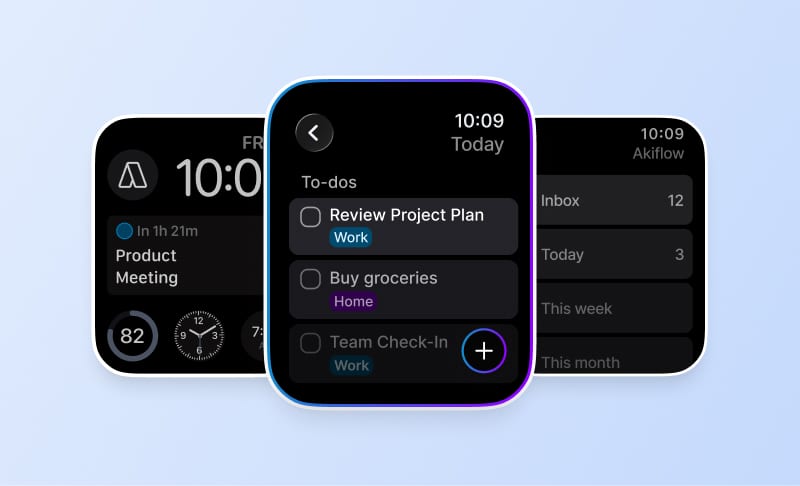
Platforms | iOS, iPad, Mac, Apple Watch | Web |
What is Fantastical?
Fantastical is a calendar and tasks app that integrates scheduling with task management, connecting to existing calendars like Google, Microsoft 365, Exchange, iCloud, Todoist, and Apple Reminders for seamless event and task handling. Known for its natural language processing capabilities and aesthetic interface, it offers templates, multiple views, time blocking, and deep Apple ecosystem integration.
🌟 Key Features of Fantastical
✦Natural Language Input: Create events and reminders easily using everyday language.
✦Task Integration: Integrates with Apple Reminders, Todoist, Google Tasks with drag-and-drop scheduling.
✦Calendar Syncing: Supports iCloud, Google Calendar, Microsoft 365, Exchange, and more for seamless integration.
✦Time Blocking: Drag tasks to specific times and days for better time management.
✦Templates: Quick event and task creation from existing items.
✦Multiple Views: Offers daily, weekly, monthly, and yearly views for different scheduling needs.
What is Friday?
Friday was a productivity and communication hub for teams designed to streamline async communication, daily standups, status updates, and planning so distributed teams could stay aligned and track work more easily. However, public information indicates Friday.app as a former/legacy product that is no longer operating as a standard end-user product.
🌟 Key Features of Friday
✦Team Check-ins: Friday provided configurable playbooks for daily standups, status updates, weekly reviews, and 1:1s to keep distributed teams aligned and reduce meeting overhead.
✦Progress Tracking: With built-in reporting and analytics, Friday helped teams track work progress and performance on updates and tasks for better visibility.
✦Async Communication: Friday streamlined internal communication with messaging-style updates designed to reduce meeting and communication chaos for distributed teams.
✦Feedback Management: The platform included feedback collection and management features to facilitate team improvement and communication.
✦Calendar Integration: Friday offered calendar-related workflows for planning and cadences, though current integrations cannot be confirmed for the legacy product.
✦Configurable Playbooks: Teams could customize their check-in processes and workflows through configurable playbooks for different types of updates and reviews.
📊 Feature Comparison
Feature | Fantastical | Friday |
|---|---|---|
📅 Calendar Integration | ✓ Yes | ◐ Limited |
✅ Task Management | ✓ Yes | ◐ Limited |
⏰ Time Blocking | ✓ Yes | ✗ No |
🗣️ Natural Language Processing | ✓ Yes | ✗ No |
🔔 Notifications | ✓ Yes | ✓ Yes |
🌍 Time Zones Support | ✓ Yes | ✓ Yes |
📆 Scheduler | ✓ Yes | ✓ Yes |
📈 Analytics | ✗ No | ✓ Yes |
🔗 Integrations
Fantastical
Google Calendar, Microsoft 365, Exchange, iCloud, Todoist, Apple Reminders, Google Tasks, Zoom, Google Meet, Microsoft Teams, Slack, CalDAV, Apple Shortcuts, Zapier (8,000+ apps)
Friday
Google Calendar, Slack, Teams, Todoist, Asana, Trello, Google Tasks, Microsoft To Do, ClickUp, Jira, GitLab, GitHub
💰 Pricing Comparison
Fantastical
$4.75/month, paid annually
Free plan with basic features. Premium plans: Individual $4.75/month (billed annually), Family $6.99/month for up to 5 users (billed annually), Team/Business $4.75/user/month (billed annually). 14-day free trial available.
Friday
Free, Team $8/user/mo, Enterprise custom
Free: Core features. Team: $8/user/mo. Enterprise: Custom pricing.
💡 Things to Consider
When Choosing Fantastical
→You're an Apple Ecosystem User: Choose Fantastical if you use only Apple devices and want a feature-rich upgrade over built-in Apple Calendar with advanced scheduling tools.
→You're a Power User with Multiple Calendars: Ideal if you manage many calendars, meetings, time zones, and need integrations with services like Zoom, Google, and Microsoft 365.
→You Value Natural Language Input: Perfect for those who appreciate adding events using natural language and want templates, calendar sets, and meeting proposals for enhanced productivity.
When Choosing Friday
→Product Status: Friday.app is indicated as a former/legacy product that is no longer operating as a standard end-user product, so availability and ongoing support cannot be confirmed.
→Focus on Communication Over Tasks: Friday was more focused on team communication rituals and updates rather than comprehensive task management, making it less suitable for teams needing full project management capabilities.
→Limited Current Information: Since the product appears to be discontinued, current pricing, features, and integrations cannot be reliably verified, and users should seek alternative solutions for team productivity needs.
⭐ User Reviews
Fantastical
"Fantastical is praised for its excellent interface, natural language input, and rich features including task integration and scheduling tools. However, it faces criticism for its subscription pricing model, Apple-only ecosystem limitation, and basic task management capabilities. While ideal for Apple power users managing multiple calendars and meetings, the recurring subscription cost and platform restrictions may be deal-breakers for budget-conscious or cross-platform users."
Friday
"Friday was designed as a productivity and communication hub for distributed teams, focusing on async updates and team alignment rather than full project management. While it offered useful features for team check-ins and progress tracking, the product is no longer operating as an active end-user service."
🎯 Conclusion
Both Fantastical and Friday are excellent productivity tools with their own strengths.
Fantastical excels in Natural Language Input: Create events and reminders easily using everyday language., while Friday shines with Team Check-ins: Friday provided configurable playbooks for daily standups, status updates, weekly reviews, and 1:1s to keep distributed teams aligned and reduce meeting overhead.. The best choice depends on your specific needs, workflow preferences, and budget.
We recommend trying both tools to see which one fits better with your productivity style.