Akiflow vs Timestripe: Long-Term Goals or Daily Capacity?

3

Summary
Timestripe emphasizes connecting longer-term goals with daily actions; Akiflow emphasizes fitting commitments into a calendar. Choose according to the planning layer you are missing.
Timestripe’s exported goals appear as all-day calendar items, which should not be mistaken for reserved work sessions with a defined duration.
Test one longer-term goal and its next action to distinguish difficulty choosing worthwhile work from difficulty protecting time to carry it out.
Reviewed October 17, 2026. Published by Akiflow. This comparison is based on the official documentation linked below, not a hands-on benchmark or an independent review.
Apple Watch and iCloud comparison
Feature | Akiflow | Timestripe |
|---|---|---|
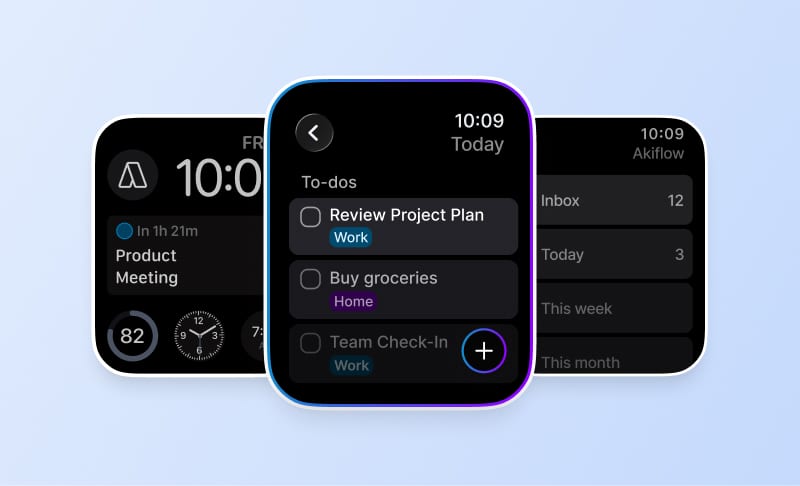
Apple Watch | Native capture and completion | Not confirmed in reviewed docs |
iCloud Calendar | Direct two-way event connection | Goals exported as all-day events |
A native Timestripe Apple Watch app was not established by the official sources reviewed. Verify current availability if Watch capture is a deciding factor. Timestripe documents sending goals to Google and Apple calendars as all-day events. That should not be described as the same behavior as timed task blocks or direct two-way iCloud event editing.
Reviewed October 17, 2026. Native Watch apps, mirrored notifications, task-data sync and calendar subscriptions are different capabilities. Unconfirmed means the reviewed sources do not establish support, not that the feature is necessarily unavailable.
Official evidence: Timestripe source 1. Akiflow Watch documentation; Akiflow iCloud documentation.
The difference that matters
A long-term goal can provide direction without specifying the next available hour of work. A calendar can protect an hour without proving that the work is worth doing. These tools emphasize different parts of that chain, so choose based on the planning layer you are missing.
What this looks like in a real workday
Learning a language may be a yearly goal with weekly practice commitments. Timestripe’s goal-oriented approach can help preserve that direction. A calendar planner helps you decide whether practice happens before work, during a gap or after dinner when the week becomes busy.
Where the trade-offs are
Exported goals appearing on a calendar are not necessarily timed work sessions. Treat an all-day item as a planning prompt unless you have separately reserved the duration needed to complete it.
Apple Calendar and Apple Watch
Timestripe: calendar support
Timestripe documents sending goals to Google and Apple calendars as all-day events. That should not be described as the same behavior as timed task blocks or direct two-way iCloud event editing.
Timestripe: Apple Watch
A native Timestripe Apple Watch app was not established by the official sources reviewed. Verify current availability if Watch capture is a deciding factor.
Akiflow: iCloud events and wrist-based capture
Akiflow connects directly to iCloud Calendar. Event changes can sync in both directions, subject to calendar permissions. Scheduling a task does not automatically export it: use Lock to publish a task or Time Slot to an editable calendar. Calendar updates are periodic, not an instant-sync guarantee.
The Apple Watch companion supports task capture by text or dictation, completion and reopening, and views of what is current or next. It requires watchOS 10 or later and a paired iPhone running Akiflow 2.83 or later. It is not a full scheduling editor: Aki, natural-language scheduling, and task editing, rescheduling or deletion are not available on the Watch.
See the iCloud Calendar guide and Apple Watch guide for setup and limits. The Akiflow fall update also covers Travel Time and the desktop redesign.
How to make the decision
Choose one longer-term goal and define its next action. Check whether your missing step is selecting that action or protecting a realistic time to do it.
Before changing systems, use a normal busy day rather than an empty demo calendar. Include one changed meeting, one task that takes longer than expected and one new commitment. A useful workflow should make the resulting trade-offs clear without requiring you to maintain conflicting copies of the same work.
Cost and buying considerations
Compare the plan that includes the features you actually need, the billing period, and whether the cost is per person or per workspace. Do not treat a calendar subscription, a native app and a two-way integration as interchangeable paid features.
Check Akiflow’s current pricing before purchasing. This article does not reproduce old promotional prices or unsupported star ratings.
Official sources
Frequently Asked Questions
How do goal planning and daily calendar planning differ?
A longer-term goal provides direction but does not necessarily identify the next available hour for work. A calendar can reserve that hour without establishing whether the activity is worth doing. Timestripe and Akiflow emphasize different parts of this process, so choose according to whether you lack direction, a next action or available work time.
Does an exported Timestripe goal reserve a timed work session?
No. Its calendar export places goals as all-day items in Google or Apple Calendar. Treat such an item as a planning prompt, not proof that the required time has been reserved. A timed work session still needs a duration and a place in the day, separate from the goal’s calendar visibility.
How would this distinction apply to learning a language?
A yearly language-learning goal can lead to weekly practice commitments. A goal-oriented approach helps preserve that direction, while calendar planning addresses whether practice fits before work, in a gap or after dinner during a busy week. The goal and the work period serve different purposes; neither makes the other unnecessary.
What is a useful test before choosing either tool?
Choose one longer-term goal and define the next action that would advance it. Then examine where the process stalls: selecting that action or protecting a realistic time to do it. This makes the comparison about a missing planning step, rather than assuming that a calendar block supplies direction or a goal supplies available hours.
Can I use Akiflow on Apple Watch to reorganize my plan?
Its Watch companion supports quick task capture, completion, reopening and checking current or upcoming work. It is not a full scheduling editor, so use the main app for editing tasks and reorganizing the day. Dictating task text on the Watch does not provide natural-language scheduling or automatically place a goal into a work session.