Akiflow vs Taskade: AI Workspaces or Personal Time Blocking

3

Updated October 14, 2026. Published by Akiflow. This is an editorial comparison based on the official sources linked below, not an independent hands-on benchmark.
Summary
Taskade combines collaborative workspaces and AI agents. Akiflow focuses on bringing commitments into a workable personal calendar. The decision is about the workspace you need, not a simple AI yes-or-no score.
What Taskade actually offers
Taskade documents a calendar view as well as AI agents and agent tools. Claims that it lacks AI or calendar functionality are therefore misleading. Evaluate the particular agent, permissions and workspace workflow rather than treating every automation as equivalent.
Source: Taskade official product information; Taskade official documentation.
Where Akiflow fits
Akiflow brings tasks and calendars into a personal planning workflow. Its useful role is to make the relationship between commitments and available time visible: collect actionable work, choose what matters, and reserve time around existing events. It is not a substitute for every specialized workflow in another product.
A practical decision scenario
A small team could use an agent to help prepare a project outline, then assign and review the resulting work. A team member still needs to decide when to do their part between meetings. Keep that distinction visible when comparing an AI workspace with a daily planner.
Trade-offs to consider
Do not move shared project discussions into a personal calendar merely to consolidate tools. Test whether a second planning layer reduces missed commitments enough to justify maintaining it.
iCloud Calendar and Apple Watch in Akiflow
Akiflow now connects directly to iCloud Calendar. Event changes can sync in both directions, subject to calendar permissions. Scheduling a task does not automatically export it as an event: use Lock to publish a task or Time Slot to an editable calendar. Updates are periodic rather than a promise of instant synchronization.
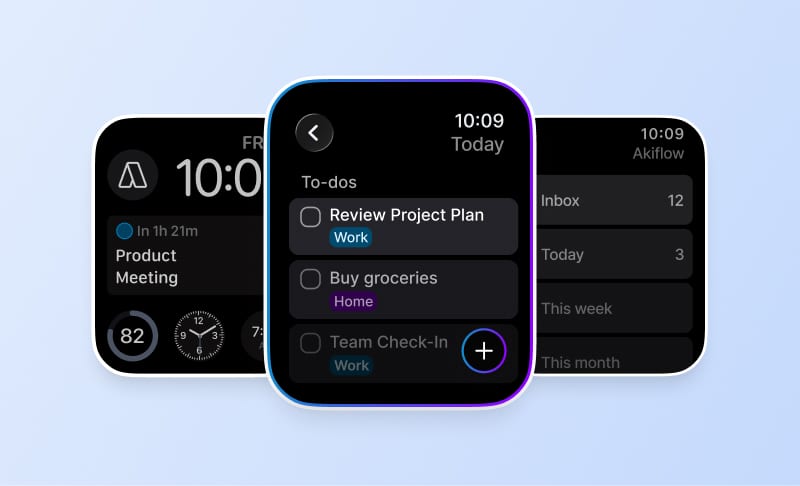
The Apple Watch companion supports task capture by text or dictation, completion and reopening, and checking what is current or next. It requires watchOS 10 or later and a paired iPhone running Akiflow 2.83 or later. Use the main app for editing, rescheduling or deleting tasks. The Watch does not provide Aki or natural-language scheduling.
Read the iCloud setup guide and Apple Watch guide for the supported workflow and its limits. The fall product update also explains Travel Time and the desktop redesign. These are Akiflow capabilities, not claims that the other product lacks every equivalent feature.
Before switching
Test with a real calendar account and a small set of non-sensitive tasks before moving your whole workflow. Include a changed appointment, an unfinished task and a new commitment. Check what synchronizes, what stays local and which system owns completion. A short successful demo does not establish reliability for every account or device.
Confirm the current plan, device support and billing terms on the official product site and Akiflow pricing page. Features may be plan-specific; this article does not reuse unverified historical prices or review scores.
FAQ
When should I choose Akiflow rather than Taskade?
Taskade combines collaborative workspaces and AI agents. Akiflow focuses on bringing commitments into a workable personal calendar. The decision is about the workspace you need, not a simple AI yes-or-no score.
Does connecting iCloud Calendar also import Apple Reminders?
No. The Akiflow connection is for calendar events. It does not import Apple Reminders, Apple Mail or calendars stored only on a device.
Can I manage the whole schedule from Akiflow on Apple Watch?
No. Use it for quick capture, completion and checking what is next. Editing tasks and reorganizing the schedule remain main-app workflows.