Akiflow vs Capacities: Knowledge Organization or Daily Execution?

3

Summary
Capacities organizes knowledge and context; Akiflow helps turn commitments into a daily plan. Decide which system owns actions and which stores supporting material.
Capacities supports Apple iCloud through CalDAV alongside Google and Microsoft calendar connections, so calendar access alone does not distinguish it from Akiflow.
Test a research-heavy task from accessible notes to a scheduled next action, watching for duplicated material and commitments between the two systems.
Reviewed October 17, 2026. Published by Akiflow. This comparison is based on the official documentation linked below, not a hands-on benchmark or an independent review.
Apple Watch and iCloud comparison
Feature | Akiflow | Capacities |
|---|---|---|
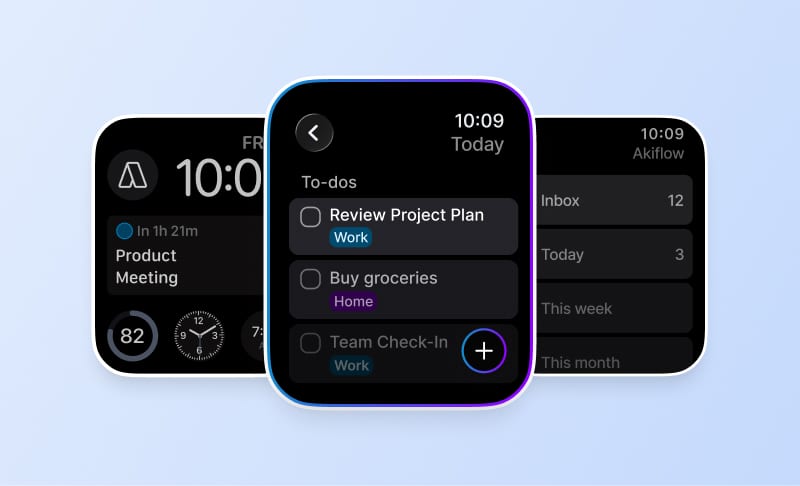
Apple Watch | Native capture and completion | Not confirmed in reviewed docs |
iCloud Calendar | Direct two-way event connection | iCloud CalDAV; notes-linked events |
A native Capacities Apple Watch application was not established in the official documentation reviewed. Confirm current support if Watch access is essential. Capacities documents Google, Microsoft 365 and Apple iCloud calendar connections. Its iCloud integration uses CalDAV; this support should not be marked as absent.
Reviewed October 17, 2026. Native Watch apps, mirrored notifications, task-data sync and calendar subscriptions are different capabilities. Unconfirmed means the reviewed sources do not establish support, not that the feature is necessarily unavailable.
Official evidence: Capacities source 1. Akiflow Watch documentation; Akiflow iCloud documentation.
The difference that matters
Keeping useful information connected helps you think and retrieve context. A task planner helps you decide what to do next and when. Many professionals need both, but they should be clear about which system owns the action and which stores its supporting material.
What this looks like in a real workday
A consultant may keep research and meeting context in a knowledge workspace, then schedule an hour to produce a recommendation. The notes help with the quality of the work; the calendar block helps ensure the work gets an opportunity to happen.
Where the trade-offs are
Adding tasks to notes does not automatically create a realistic schedule. Equally, moving all research into a task description can make it harder to reuse. Avoid forcing either product into a job it is not meant to own.
Apple Calendar and Apple Watch
Capacities: calendar support
Capacities documents Google, Microsoft 365 and Apple iCloud calendar connections. Its iCloud integration uses CalDAV; this support should not be marked as absent.
Capacities: Apple Watch
A native Capacities Apple Watch application was not established in the official documentation reviewed. Confirm current support if Watch access is essential.
Akiflow: iCloud events and wrist-based capture
Akiflow connects directly to iCloud Calendar. Event changes can sync in both directions, subject to calendar permissions. Scheduling a task does not automatically export it: use Lock to publish a task or Time Slot to an editable calendar. Calendar updates are periodic, not an instant-sync guarantee.
The Apple Watch companion supports task capture by text or dictation, completion and reopening, and views of what is current or next. It requires watchOS 10 or later and a paired iPhone running Akiflow 2.83 or later. It is not a full scheduling editor: Aki, natural-language scheduling, and task editing, rescheduling or deletion are not available on the Watch.
See the iCloud Calendar guide and Apple Watch guide for setup and limits. The Akiflow fall update also covers Travel Time and the desktop redesign.
How to make the decision
Take one research-heavy task. Keep the context accessible, assign a next action and reserve time to do it. Watch for duplicated notes or tasks between systems.
Before changing systems, use a normal busy day rather than an empty demo calendar. Include one changed meeting, one task that takes longer than expected and one new commitment. A useful workflow should make the resulting trade-offs clear without requiring you to maintain conflicting copies of the same work.
Cost and buying considerations
Compare the plan that includes the features you actually need, the billing period, and whether the cost is per person or per workspace. Do not treat a calendar subscription, a native app and a two-way integration as interchangeable paid features.
Check Akiflow’s current pricing before purchasing. This article does not reproduce old promotional prices or unsupported star ratings.
Official sources
Frequently Asked Questions
Should research notes and next actions live in the same system?
They serve different purposes: connected information supports thinking and retrieval, while a task planner helps decide what to do and when. You may need both, but establish which system owns the action and which stores the supporting material. Moving every research note into a task description can make that material harder to reuse.
What kind of work is a useful test for Capacities versus Akiflow?
Choose a research-heavy task, such as a consultant preparing a recommendation. Keep the research and meeting context accessible, identify the next action, and reserve an hour for producing the work. Check for duplicated notes or tasks as you move from understanding the material to giving the deliverable time.
Does Capacities connect to Apple iCloud calendars?
Yes. Its calendar integration documentation includes Apple iCloud through CalDAV, as well as Google and Microsoft 365 connections. That means the broader choice should stay focused on organizing knowledge versus planning daily execution. Do not treat calendar access as absent simply because Capacities is a knowledge workspace.
Why does adding a task to a note not finish the planning process?
Recording an action with its context does not automatically allocate a realistic period for doing it. A task planner addresses the separate question of when the work can happen. Keep the supporting material accessible, assign a next action, and reserve time without duplicating the same commitment between systems.
How does Akiflow publish planned work into an iCloud calendar?
Use Lock to publish a task or Time Slot to an editable calendar; merely scheduling the task inside Akiflow does not export it. The iCloud connection supports event changes in both directions subject to calendar permissions. Synchronization runs periodically, so the workflow should not depend on every change appearing instantly.